
Email Search and Display
You have picked up lots of empowering skills in this course. You know how to build GUIs, you understand about various types of persistent storage, and you can handle email. In this last lesson, we'll build an email storage and retrieval mechanism, then attach that to a graphical user interface so that the user can enter various search criteria and click on a button to see a list of matching messages. Clicking on a message from the list will display the message body. Not only that, but the messages will be stored in a relational database on an entirely different computer from the one running the program. How cool is that?
So, how will we be able to search the email? Potentially by date and by partial match on the names and email addresses of senders. We'll also be able to extend this software to handle additional headers as retrieval keys.
We'll start by writing a program to create the necessary table in the MySQL database. We'll follow that with a library to handle storage and retrieval of information in the database, along with tests that exercise the storage and retrieval functionality. Finally, we'll write a GUI-based program to query the database and display the resulting messages.
To store messages, we need a defined structure. A single table is the simplest store, so for now, we'll develop a single-table store. Once the basic message storage function is working (and tested!), we'll add columns to the table to enable new types of retrieval.
The modern email system is pretty good about allocating each individual message a globally-unique identification, which is carried in the Message-Id header. Here's a sample header from the author's current inbox:
Message-ID: <20100529085040.32283.76682@betelnutz>
To keep relationships efficient and representations clear, each message in the database will have two unique columns. There will be msgID (an integer column automatically inserted as necessary by the RDBMS and used as the primary key) and msgMessageID (the globally-unique mail system identifier). msgID will be used to refer to a message wherever possible in the system. Messages themselves do sometimes refer to each other by the Message-ID value though, so that access path is worth putting into even a basic implementation.
This initial implementation records the Message-ID header value as a database column so you can use SQL to query it. Later, certain other information will also be extracted from the messages and recorded directly in the database for the same reason. This will allow full relational operations on that data, letting the database do the retrieval tasks for which it is optimized.
The store needs an Application Programmer Interface or API. This intimidating-sounding thing is actually a set of "how-to instructions for users of the message store." The fundamental operations of storage and retrieval are described in the API. Storing a message requires that the message be passed in to the storage function. Retrieving messages requires some kind of identity to be passed in, and for the function to return a message (or raise some sort of MessageNotFound exception). Since you have decided (well, okay, we've decided) to retrieve with both "msgID" and "MessageID," it makes sense to provide two functions. Here is the API that will help you accomplish your tasks:
| Function | Purpose and interface |
|---|---|
| store(msg) | Adds the message to the store and returns its msgID value. If a message with the same value for the Message-ID header is already present in the store, the msgID of the existing message is returned. |
| message_by_id(id) | Returns the message whose primary key value is id or raises an exception if no such message is present. |
| message_by_messageid(message_id) | Returns the message whose MessageId value is message_id or raises an exception if no such message is present. |
This is only an initial attempt to define the interface. Don't think of it as something set in stone. Often, after working with a newly-designed API for a little while, it turns out to be less than ideal. In that case, feel free to change it—programmer convenience is more important than strict adherence to existing APIs. Never be afraid to rework a portion of your design; well-designed systems are the result of experimentation and revision.
The message store is deliberately uncomplicated. You may be surprised at how sophisticated your queries have become by the end of the lesson. Initially there are just three columns: the id (automatically generated by the database), the Message-ID header value, and the message itself, represented in the most fundamental way: as the sequence of characters that was received over the network. This sequence can be parsed by the email module to produce email.Message objects. More columns will be added to the database table as its scope and capabilities grow.
Start MySQL at the terminal window, and create this table as shown:
mysql> CREATE TABLE message(
    ->     msgID INTEGER AUTO_INCREMENT PRIMARY KEY,
    ->     msgMessageID VARCHAR(128),
    ->     msgText LONGTEXT);
Query OK, 0 rows affected (0.18 sec)
That's it. You now have a table in which to store your messages. The message itself is stored as a character sequence in a LONGTEXT column. This particular type of column is designed to allow storage of arbitrary character strings. Email can be tricky stuff to store; not all messages will necessarily be in the same character set and no global default can be applied. (For example, sometimes the header data explains that certain portions of the message are in specific encodings).
Processing the message to create an email.Message object is the most efficient way to extract the Message-Id header. For now, if you want to find out anything else about the message once it's been stored, you'll need to read its text in from the database and parse it again. By ensuring all messages are parsed before entering the database, you guarantee they can be parsed upon retrieval.
At some point you may consider using some more efficient storage representation, such as a pickle. But an email is not necessarily best represented as a single object, so your initial approach will be the more conservative one outlined above. Remember—first, make it work! You can update the storage mechanism later if necessary.
You only need two pieces of data in order to insert a new row (representing a new message) into the message table: the Message ID and the bytestring representation of the message. The third column (primary key) will be populated automatically. So if you have the Message ID and the string representation in variables message_id, and text respectively, along with a database cursor in curs, the required statement would look like this:
curs.execute("INSERT INTO message(msgMessageID, msgText) VALUES (%s, %s)",
            (message_id, text))
Now that the table has been created, you need Python functionality that allows you to store, and retrieve, email messages.
| Note | Users of this API don't need to know how the data is stored in the database. If the API does not provide them with the features they need, knowledge of the structures allows the use of raw SQL, but it's better to try and avoid this. If only your code updates the database, then only you are responsible for its consistency. This is a good practice to adhere to in database management. |
Before you insert the message into the database, you need to make sure that it isn't in there already. You could either retrieve the set of all rows having the given message ID and make sure that it is empty, or you could count all of the rows with a specific message-id. Since you need the primary key of the message when it is present in the database anyway (to return as the value of the function), you may as well try and retrieve it now.
| Note | When there is a possibility of retrieving lots of rows, but you only want to know how many there are, it's usually much more efficient to use the SQL COUNT(*) function we discussed earlier. |
Create a EmailSearch project and assign it to the Python2_Lessons working set. Copy the database.py file from python2_lesson10/src to your EmailSearch/src folder. Then, in the EmailSearch/src folder, create a new Python file named maildb.py as shown:
"""
Email message handling module: contains logic to store
email messages using a MySQL relational database.
"""
from database import login_info
import mysql.connector as msc
from email import message_from_string

conn = msc.Connect(**login_info)
curs = conn.cursor()

def store(msg):
    """
    Stores an email message, if necessary, returning its primary key.
    """
    message_id = msg['message-id']
    text = msg.as_string()
    curs.execute("SELECT msgID FROM message WHERE msgMessageID=%s", (message_id, ))
    result = curs.fetchone()
    if result:
        return result[0]
    curs.execute("INSERT INTO message (msgMessageID, msgText) VALUES (%s, %s)",
             (message_id, text))
    conn.commit()
    curs.execute("SELECT msgID FROM message WHERE msgMessageID=%s", (message_id, ))
    return curs.fetchone()[0]
This maildb module defines a single function, which takes a parsed email.Message and its textual equivalent as arguments. First, the function extracts the message's Message-ID header value, and attempts to retrieve the msgid of the message with that message_id (in case it already exists).
Sadly, we broke the first rule of test-driven development here! Remember it? "Only write code to make a failing test pass." But we wrote the code before writing the tests. Yes, we have led you down a dark and evil path. Don't let us do it again! Let's write the tests now. To get going in the right direction, we'll even add some tests that we know the existing code cannot pass, and then augment our code to make them pass in true test-driven development fashion.
In our consideration of email, we saw that the Message-ID header was a possible (candidate) primary key. While we do need to store this value as a column in the database (messaging systems often use Message-ID values to refer to other messages), it should not be the primary key—it's too long, and strings take longer to compare than numbers. So we made the primary key the msgid column, with values that are automatically allocated as rows are added to the database.
Now we can store messages in the database, right? Well, the only way to test storage is to retrieve data and verify that it agrees with what was stored. So we need a way of getting the information out—in fact we need two ways. We need to be able to retrieve a message with a given primary key, and with a given Message-ID header value. The code for each is somewhat similar.
Here's our testing strategy: each message is reconstituted from a text file, then stored using the maildb.store() function. As the program iterates over the message files and stores the messages, it builds two dicts. The first one, msgids, maps Message-ID values to primary keys. The second, message_ids, maps primary key values to Message-ID values. The content of the dicts is used by the test_msg_ids() and test_message_ids() methods to verify that the expected message does indeed come back after retrieval by one or the other of the keys.
In the EmailSearch/src folder, create a testMaildb.py file as shown:
"""
Read in and parse email messages to verify readability.

NOTE: This test creates the message table, dropping any
previous version and should leave it empty. DANGER: this
test will delete any existing message table.
"""

from glob import glob
from email import message_from_string
import mysql.connector as msc
from database import login_info
import maildb
import unittest

conn = msc.Connect(**login_info)
curs = conn.cursor()

TBLDEF = """\
CREATE TABLE message (
     msgID INTEGER AUTO_INCREMENT PRIMARY KEY,
     msgMessageID VARCHAR(128),
     msgText LONGTEXT
)"""
FILESPEC = "C:/PythonData/*.eml"

class testRealEmail_traffic(unittest.TestCase):

    def setUp(self):
        """
        Reads an arbitrary number of mail messages and
        stores them in a brand new messages table.

        DANGER: Any existing message table WILL be lost.
        """
        curs.execute("DROP TABLE IF EXISTS message")
        conn.commit()
        curs.execute(TBLDEF)
        conn.commit()
        files = glob(FILESPEC)
        self.msgids = {} # Keyed by message_id
        self.message_ids = {} # keyed by id
        for f in files:
            ff = open(f)
            text = ff.read()
            msg = message_from_string(text)
            id = self.msgids[msg['message-id']] = maildb.store(msg)
            self.message_ids[id] = msg['message-id']

    def test_not_empty(self):
        """
        Verify that the setUp method actually created some messages.
        If it finds no files there will be no messages in the table,
        the loop bodies in the other tests will never run, and potential
        errors will never be discovered.
        """
        curs.execute("SELECT COUNT(*) FROM message")
        messagect = curs.fetchone()[0]
        self.assertGreater(messagect, 0, "Database message table is empty")

    def test_message_ids(self):
        """
        Verify that items retrieved by id have the correct Message-ID.
        """
        for message_id in self.msgids.keys():
            pk, msg = maildb.msg_by_id(self.msgids[message_id])
            self.assertEqual(msg['message-id'], message_id)

    def test_ids(self):
        """
        Verify that items retrieved by message_id have the correct Message-ID.
        """
        for id in self.message_ids.keys():
            pk, msg = maildb.msg_by_message_id(self.message_ids[id])
            self.assertEqual(msg['message-id'], self.message_ids[id])

if __name__  == "__main__":
    unittest.main()
The tests fail, because the code calls two retrieval functions that we may not have written yet.
Move your cursor over the red "X" in your editor's margin, and you'll see a tooltip that says something like "Undefined variable from import: msg_by_id". The resulting AttributeError exceptions cause the test to fail:
EE.
======================================================================
ERROR: test_ids (__main__.testRealEmail_traffic)
----------------------------------------------------------------------
Traceback (most recent call last):
  File "testMaildb.py", line 62, in test_ids
    pk, msg = maildb.msg_by_message_id(self.message_ids[id])
AttributeError: 'module' object has no attribute 'msg_by_message_id'

======================================================================
ERROR: test_message_ids (__main__.testRealEmail_traffic)
----------------------------------------------------------------------
Traceback (most recent call last):
  File "testMaildb.py", line 54, in test_message_ids
    pk, msg = maildb.msg_by_id(self.msgids[message_id])
AttributeError: 'module' object has no attribute 'msg_by_id'

----------------------------------------------------------------------
Ran 3 tests in 0.688s

FAILED (errors=2)
The tests fail because there is no code present to implement the retrieval functions msg_by_id() and msg_by_message_id(). In this case, failure is great news—it means we're in proper test-driven development mode, now all we have to do is write those functions to pass the tests. Both of the retrieval functions return the message and its primary key. No matter how data is retrieved, store it using the primary key value to select the row to be updated.
The msg_by_id() function takes a primary key (id) value as its argument and executes a query to retrieve the message (along with the primary key). If this query returns an empty result set, the function raises a KeyError exception. Otherwise, msg_by_id() extracts the message text and its primary key from the database, and returns the primary key and a newly-parsed mail message.
This test mechanism is somewhat inefficient because it creates the table and then drops it for each individual test; it would be better to run the data creation once and then run each individual test. But we want to have two separate tests to make sure that a failure in one retrieval routine won't stop us from testing the other, so for now we'll put up with this bit of inefficiency.
Edit your maildb.py library to add this retrieval function as shown:
"""
Email message handling module: contains logic to store and retrieve
email messages using a MySQL relational database.
"""
from database import login_info
import mysql.connector as msc
from email import message_from_string

conn = msc.Connect(**login_info)
curs = conn.cursor()

def store(msg):
    """
    Stores an email message, if necessary, returning its primary key.
    """
    message_id = msg['message-id']
    text = msg.as_string()
    curs.execute("SELECT msgID FROM message WHERE msgMessageID=%s", (message_id, ))
    result = curs.fetchone()
    if result:
        return result[0]
    curs.execute("INSERT INTO message (msgMessageID, msgText) VALUES (%s, %s)",
             (message_id, text))
    conn.commit()
    curs.execute("SELECT msgID FROM message WHERE msgMessageID=%s", (message_id, ))
    return curs.fetchone()[0]

def msg_by_id(id):
    """
    Return the (presumably singleton) message whose primary key is given
    or raise KeyError if no such message exists.
    """
    curs.execute("SELECT msgID, msgText FROM message WHERE msgID=%s", (id, ))
    result = curs.fetchone()
    if  not result:
        raise KeyError("Id {0} not found in store".format(id))
    id, text = result
    msg = message_from_string(text)
    return id, msg
With this new logic in place, one of the tests will succeed when you re-run testMaildb.py:
E..
======================================================================
ERROR: test_ids (__main__.testRealEmail_traffic)
----------------------------------------------------------------------
Traceback (most recent call last):
  File "testMaildb.py", line 62, in test_ids
    pk, msg = maildb.msg_by_message_id(self.message_ids[id])
AttributeError: 'module' object has no attribute 'msg_by_message_id'

----------------------------------------------------------------------
Ran 3 tests in 0.578s

FAILED (errors=1)
There is little difference between msg_by_id() and msg_by_message_id(). It is just a matter of using a slightly different condition on the query. Modify maildb.py by adding the code below as shown:
"""
Email message handling module: contains logic to store and retrieve
email messages using a MySQL relational database.
"""
from database import login_info
import mysql.connector as msc
from email import message_from_string

conn = msc.Connect(**login_info)
curs = conn.cursor()

def store(msg):
    """
    Stores an email message, if necessary, returning its primary key.
    """
    message_id = msg['message-id']
    text = msg.as_string()
    curs.execute("SELECT msgID FROM message WHERE msgMessageID=%s", (message_id, ))
    result = curs.fetchone()
    if result:
        return result[0]
    curs.execute("INSERT INTO message (msgMessageID, msgText) VALUES (%s, %s)",
             (message_id, text))
    conn.commit()
    curs.execute("SELECT msgID FROM message WHERE msgMessageID=%s", (message_id, ))
    return curs.fetchone()[0]

def msg_by_id(id):
    """
    Return the (presumably singleton) message whose primary key is given
    or raise KeyError if no such message exists.
    """
    curs.execute("SELECT msgID, msgText FROM message WHERE msgID=%s", (id, ))
    result = curs.fetchone()
    if  not result:
        raise KeyError("Id {0} not found in store".format(id))
    id, text = result
    msg = message_from_string(text)
    return id, msg

def msg_by_message_id(message_id):
    """
    Return the (presumably singleton) message whose "Message-ID" is given
    or raise KeyError if no such message exists.
    """
    curs.execute("SELECT msgID, msgText FROM message WHERE msgMessageID=%s", (message_id, ))
    result = curs.fetchone()
    if  not result:
        raise KeyError("Message-Id {0} not found in store".format(message_id))
    id, text = result
    msg = message_from_string(text)
    return id, msg
Finally, all of our tests pass, and we can proceed to develop this basic library into something we can really use:
...
----------------------------------------------------------------------
Ran 3 tests in 0.580s

OK
| Modern Python | The code above uses from email import message_from_string, which returns a legacy
email.message.Message object. In Python 3.6+ you can instead use
email.message_from_string(text, policy=email.policy.default) (or
email.message_from_bytes(data, policy=email.policy.default) when working with raw bytes),
which returns an EmailMessage object. EmailMessage provides higher-level
conveniences such as .get_body(), .iter_attachments(), and correct handling of
encoded headers. The legacy interface remains available and the course code works unchanged, but new
code should prefer policy=email.policy.default. |
According to our tests, we can now store email messages in a relational database and retrieve them either by primary key or Message-ID value. The Message-ID is extracted from the message when it is stored. It doesn't hurt to leave records lying around after a test, to allow testers to query the database manually and see what else can be done with the records, though the production installers prefer to have the tables left in a known empty state. It certainly doesn't hurt to know that the table passed its basic tests after installation. There are other pieces of information about the messages that you might like to store in the relational database to expand your retrieval capabilities even further. Specifically, you want to be able to retrieve messages sent between specific dates and/or times, and from specific senders, by name or address.
To accomplish that, we'll add a new column containing the message date. But it wouldn't be particularly useful to store it as a text column in the database, because the database cannot execute time-based calculations on strings. So instead, after you have extracted the Date header value from the parsed message, convert it into a Python datetime.datetime object, which the database driver will then convert into a MySQL DATETIME value, for storage in the database.
We'll modify the test program, adding a msgDate column to the table definition and add tests of the date retrieval function. We'll write that function later; it will look like this:
def msgs_by_date(mindate, maxdate)
Retrieval by date is different from retrieval by primary key or Message-ID—there is a real possibility that multiple messages will have the same date, causing the new function to return multiple records.
Our tests should work independently of the test data. To test the date routine, we'll change the date creation code in the setUp() method so that it also records the minimum and maximum datetime and a message count. Then we'll add a third test, test_dates(), that requests retrieval of all messages between the minimum and maximum datetimes, and verifies that the count is correct, and that all messages have the correct msgid values. Modify testMaildb.py as shown:
"""
Read in and parse email messages to verify readability.

NOTE: This test creates the message table, dropping any
previous version and should leave it empty. DANGER: this
test will delete any existing message table.
"""
from glob import glob
from email import message_from_string
import mysql.connector as msc
from database import login_info
import maildb
import unittest
import datetime
from email.utils import parsedate_tz, mktime_tz

conn = msc.Connect(**login_info)
curs = conn.cursor()

TBLDEF = """\
CREATE TABLE message (
     msgID INTEGER AUTO_INCREMENT PRIMARY KEY,
     msgMessageID VARCHAR(128),
     msgDate DATETIME,
     msgText LONGTEXT
)"""
FILESPEC = "C:/PythonData/*.eml"

class testRealEmail_traffic(unittest.TestCase):

    def setUp(self):
        """
        Reads an arbitrary number of mail messages and
        stores them in a brand new messages table.

        DANGER: Any existing message table WILL be lost.
        """
        curs.execute("DROP TABLE IF EXISTS message")
        conn.commit()
        curs.execute(TBLDEF)
        conn.commit()
        files = glob(FILESPEC)
        self.msgids = {} # Keyed by message_id
        self.message_ids = {} # keyed by id
        self.msgdates = []
        self.rowcount = 0
        for f in files:
            ff = open(f)
            text = ff.read()
            msg = message_from_string(text)
            id = self.msgids[msg['message-id']] = maildb.store(msg)
            self.message_ids[id] = msg['message-id']
            date = msg['date']
            self.msgdates.append(datetime.datetime.fromtimestamp(mktime_tz(parsedate_tz(date))))
            self.rowcount += 1 # Assuming no duplicated Message-IDs

    def test_not_empty(self):
        """
        Verify that the setUp method actually created some messages.
        If it finds no files there will be no messages in the table,
        the loop bodies in the other tests will never run, and potential
        errors will never be discovered.
        """
        curs.execute("SELECT COUNT(*) FROM message")
        messagect = curs.fetchone()[0]
        self.assertGreater(messagect, 0, "Database message table is empty")

    def test_message_ids(self):
        """
        Verify that items retrieved by id have the correct Message-ID.
        """
        for message_id in self.msgids.keys():
            id, msg = maildb.msg_by_id(self.msgids[message_id])
            self.assertEqual(msg['message-id'], message_id)
            self.assertEqual(id, self.msgids[message_id])

    def test_ids(self):
        """
        Verify that items retrieved by message_id have the correct Message-ID.
        """
        for id in self.message_ids.keys():
            id1, msg = maildb.msg_by_message_id(self.message_ids[id])
            self.assertEqual(msg['message-id'], self.message_ids[id])
            self.assertEqual(id, id1)

    def test_dates(self):
        """
        Verify that retrieving records between the minimum and maximum dates
        returns an appropriate number of records.
        """
        mind = min(self.msgdates)
        mindate = datetime.date(mind.year, mind.month, mind.day)
        maxd = max(self.msgdates)
        maxdate = datetime.date(maxd.year, maxd.month, maxd.day)
        self.assertEqual(self.rowcount,
                         len(maildb.msgs_by_date(mindate=mindate,
                                                 maxdate=maxdate)))

if __name__  == "__main__":
    unittest.main()
Assigning this test the task of creating the table, ensures that the table definition stays up-to-date. This is actually the only way the tests can succeed—if SQL refers to a nonexistent column, the Python code that uses it will raise an exception.
The updated test fails, because we haven't updated the library yet. But hey, at least the original tests are still passing! The new test fails because it calls a function that we haven't written yet:
E...
======================================================================
ERROR: test_dates (__main__.testRealEmail_traffic)
----------------------------------------------------------------------
Traceback (most recent call last):
  File "testMaildb.py", line 83, in test_dates
    len(maildb.msgs_by_date(mindate=mindate,
AttributeError: 'module' object has no attribute 'msgs_by_date'

----------------------------------------------------------------------
Ran 4 tests in 0.672s

FAILED (errors=1)
We don't need to add much code to store the messages—the change looks bigger than it otherwise might because some operations have been re-ordered to avoid unnecessary work. We do need to import a couple of bits of code from email.utils and datetime. And, if the record isn't already present, the store() function extracts and converts the date, before storing it as an additional column in the table.
Now we need some way of retrieving the messages by date. We'll add a msgs_by_date() function that takes a minimum and/or a maximum date. The SQL that is generated makes sure that only one date will be provided. The parameters are dates rather than date-times, because we assume that humans are more interested in dates than times for most purposes. For the upper limit, we add a day to the given date and use a "less than" comparison. The code requires that at least one criterion be provided, and there is some logic to allow the code to work with either one or two conditions. Modify maildb.py as shown below:
"""
Email message handling module: contains logic to store and retrieve
email messages using a MySQL relational database.
"""
from database import login_info
import mysql.connector as msc
from email import message_from_string
from email.utils import parsedate_tz, mktime_tz
from datetime import datetime, timedelta

conn = msc.Connect(**login_info)
curs = conn.cursor()

def store(msg):
    """
    Stores an email message, if necessary, returning its primary key.
    """
    message_id = msg['message-id']

    curs.execute("SELECT msgID FROM message WHERE msgMessageID=%s", (message_id, ))
    result = curs.fetchone()
    if result:
        return result[0]
    date = msg['date']
    dt = datetime.fromtimestamp(mktime_tz(parsedate_tz(date)))
    text = msg.as_string()
    curs.execute("INSERT INTO message (msgMessageID, msgDate, msgText) VALUES (%s, %s, %s)",
             (message_id, dt, text))
    conn.commit()
    curs.execute("SELECT msgID FROM message WHERE msgMessageID=%s", (message_id, ))
    return curs.fetchone()[0]

def msg_by_id(id):
    """
    Return the (presumably singleton) message whose primary key is given
    or raise KeyError if no such message exists.
    """
    curs.execute("SELECT msgID, msgText FROM message WHERE msgID=%s", (id, ))
    result = curs.fetchone()
    if  not result:
        raise KeyError("Id {0} not found in store".format(id))
    id, text = result
    msg = message_from_string(text)
    return id, msg

def msg_by_message_id(message_id):
    """
    Return the (presumably singleton) message whose "Message-ID" is given
    or raise KeyError if no such message exists.
    """
    curs.execute("SELECT msgID, msgText FROM message WHERE msgMessageID=%s", (message_id, ))
    result = curs.fetchone()
    if  not result:
        raise KeyError("Message-Id {0} not found in store".format(message_id))
    id, text = result
    msg = message_from_string(text)
    return id, msg

def msgs_by_date(mindate=None, maxdate=None):
    if not (mindate or maxdate):
        raise TypeError("Must provide at least one of mindate, maxdate")
    conds = []
    data = []
    if mindate:
        conds.append("msgDate >= %s")
        data.append(mindate)
    if maxdate:
        conds.append("msgdate < %s")
        data.append(maxdate+timedelta(days=1))
    sql = "SELECT msgid, msgText FROM message WHERE "
    sql += " AND ".join(conds)
    curs.execute(sql, tuple(data))
    result = []
    for id, text in curs.fetchall():
        result.append((id, message_from_string(text)))
    return result
Verify that all of the tests now pass and also to confirm that we have implemented date-based storage correctly:
....
----------------------------------------------------------------------
Ran 4 tests in 0.890s

OK
Tests all passed. Excellent. Proceed!
You might have thought you had the beginnings of a useful library with maildb.py, but the design is missing something—descriptions of the practical uses your program could fulfill using the library or use cases.
We know we can retrieve mail by date now, but typically we want to apply the date restrictions along with other constraints, like "sent by user@domain" or "recipients include user@domain." Before we go any further, we'll want to know more about the application that will be using the library.
You can always work directly with the database tables to provide a date-ordered listing of subjects. In the EmailSearch/src folder, create mlist1.py as shown:
"""
Sample program to list subjects by date.
"""
from database import login_info
import mysql.connector
from email import message_from_string
conn = mysql.connector.Connect(**login_info)
curs = conn.cursor()
curs.execute("SELECT msgText FROM message ORDER BY msgDate")
for text, in curs.fetchall():
    msg = message_from_string(text)
    print(msg['date'], msg['subject'])
So, what are the retrieval requirements of this application? The intention is to allow the user to enter any or all of a start date, an end date, sender's name, and sender's email address, and then to list the dates and subject lines of each message. They should be able to click a message to display it.
As we saw earlier, the existing date field in the table allows us to select dates, but at present, we are not extracting the other necessary values—sender's name and email address—as database columns. We need to fix that. The sender's data are held in the From header. The format of the header data allows the inclusion of both a textual name and email address; the email.utils library has a parseaddr() function that we can use to move both pieces of information from the From header into a (name, address) tuple. That data can then be stored in two additional columns in the messages table. The code changes are subtle, particularly since we aren't adding any new retrieval routines this time around. Modify maildb.py as shown:
"""
Email message handling module: contains logic to store and retrieve
email messages using a MySQL relational database.
"""
from database import login_info
import mysql.connector as msc
from email import message_from_string
from email.utils import parsedate_tz, mktime_tz, parseaddr
from datetime import datetime, timedelta

conn = msc.Connect(**login_info)
curs = conn.cursor()

def store(msg):
    """
    Stores an email message, if necessary, returning its primary key.
    """
    message_id = msg['message-id']
    curs.execute("SELECT msgID FROM message WHERE msgMessageID=%s", (message_id, ))
    result = curs.fetchone()
    if result:
        return result[0]
    date = msg['date']
    name, email = parseaddr(msg['from'])
    dt = datetime.fromtimestamp(mktime_tz(parsedate_tz(date)))
    text = msg.as_string()
    curs.execute("""INSERT INTO message
                    (msgMessageID, msgDate, msgSenderName, msgSenderAddress, msgText)
                    VALUES (%s, %s, %s, %s, %s)""",
                    (message_id, dt, name, email, text))
    conn.commit()
    curs.execute("SELECT msgID FROM message WHERE msgMessageID=%s", (message_id, ))
    return curs.fetchone()[0]

def msg_by_id(id):
    """
    Return the (presumably singleton) message whose primary key is given
    or raise KeyError if no such message exists.
    """
    curs.execute("SELECT msgID, msgText FROM message WHERE msgID=%s", (id, ))
    result = curs.fetchone()
    if  not result:
        raise KeyError("Id {0} not found in store".format(id))
    id, text = result
    msg = message_from_string(text)
    return id, msg

def msg_by_message_id(message_id):
    """
    Return the (presumably singleton) message whose "Message-ID" is given
    or raise KeyError if no such message exists.
    """
    curs.execute("SELECT msgID, msgText FROM message WHERE msgMessageID=%s", (message_id, ))
    result = curs.fetchone()
    if  not result:
        raise KeyError("Message-Id {0} not found in store".format(message_id))
    id, text = result
    msg = message_from_string(text)
    return id, msg


def msgs(mindate=None, maxdate=None, namesearch=None, addsearch=None):
    """
    Return a list of all messages sent on or after mindate and on or before maxdate.
    If mindate is not specified, there is no lower bound on the date, and similarly
    if maxdate is not specified, no upper bound. If namesearch is given, the
    result set is restricted to messages with sender names containing that string. If
    addsearch is given, the result set is restricted to messages with email
    addresses containing that string.
    """

    conds = []
    data = []
    if mindate:
        conds.append("msgDate >= %s")
        data.append(mindate)
    if maxdate:
        conds.append("msgdate < %s")
        data.append(maxdate+timedelta(days=1))
    if namesearch:
        conds.append("msgSenderName LIKE %s")
        data.append("%" + namesearch.strip().lower() + "%")
    if addsearch:
        conds.append("msgSenderAddress LIKE %s")
        data.append("%" + addsearch.strip().lower() + "%")


    sql = "SELECT msgid, msgText FROM message"
    if conds:
        sql += " WHERE " + " AND ".join(conds)
    curs.execute(sql, tuple(data))
    result = []
    for id, text in curs.fetchall():
        result.append((id, message_from_string(text)))
    return result
This revision breaks our existing tests. The library now references columns that have not been added to the database yet, so the driver complains during setup for each of the tests when we try to add a row. Also, pay attention to the change of function names in the module. Because the new retrieval function we wrote does more now that just retrieve mail by date, its name is something less specialized: msgs.
EEEE
======================================================================
ERROR: test_dates (__main__.testRealEmail_traffic)
----------------------------------------------------------------------
Traceback (most recent call last):
  File "testMaildb.py", line 51, in setUp
    id = self.msgids[msg['message-id']] = maildb.store(msg)
  File "maildb.py", line 30, in store
    (message_id, dt, name, email, text))
  File "C:\python\lib\site-packages\mysql\connector\cursor.py", line 307, in execute
    res = self.db().protocol.cmd_query(stmt)
  File "C:\python\lib\site-packages\mysql\connector\protocol.py", line 137, in deco
    return func(*args, **kwargs)
  File "C:\python\lib\site-packages\mysql\connector\protocol.py", line 482, in cmd_query
    return self.handle_cmd_result(self._recv_packet())
  File "C:\python\lib\site-packages\mysql\connector\protocol.py", line 175, in _recv_packet
    MySQLProtocol.raise_error(buf)
  File "C:\python\lib\site-packages\mysql\connector\protocol.py", line 169, in raise_error
    raise errors.get_mysql_exception(errno,errmsg)
mysql.connector.errors.ProgrammingError: 1054: Unknown column 'msgSenderName' in 'field list'

======================================================================
ERROR: test_ids (__main__.testRealEmail_traffic)
----------------------------------------------------------------------
Traceback (most recent call last):
  File "testMaildb.py", line 51, in setUp
    id = self.msgids[msg['message-id']] = maildb.store(msg)
  File "maildb.py", line 30, in store
    (message_id, dt, name, email, text))
  File "C:\python\lib\site-packages\mysql\connector\cursor.py", line 307, in execute
    res = self.db().protocol.cmd_query(stmt)
  File "C:\python\lib\site-packages\mysql\connector\protocol.py", line 137, in deco
    return func(*args, **kwargs)
  File "C:\python\lib\site-packages\mysql\connector\protocol.py", code 482, in cmd_query
    return self.handle_cmd_result(self._recv_packet())
  File "C:\python\lib\site-packages\mysql\connector\protocol.py", line 175, in _recv_packet
    MySQLProtocol.raise_error(buf)
  File "C:\python\lib\site-packages\mysql\connector\protocol.py", line 169, in raise_error
    raise errors.get_mysql_exception(errno,errmsg)
mysql.connector.errors.ProgrammingError: 1054: Unknown column 'msgSenderName' in 'field list'

======================================================================
ERROR: test_message_ids (__main__.testRealEmail_traffic)
----------------------------------------------------------------------
Traceback (most recent call last):
  File "testMaildb.py", line 51, in setUp
    id = self.msgids[msg['message-id']] = maildb.store(msg)
  File "maildb.py", line 30, in store
    (message_id, dt, name, email, text))
  File "C:\python\lib\site-packages\mysql\connector\cursor.py", line 307, in execute
    res = self.db().protocol.cmd_query(stmt)
  File "C:\python\lib\site-packages\mysql\connector\protocol.py", line 137, in deco
    return func(*args, **kwargs)
  File "C:\python\lib\site-packages\mysql\connector\protocol.py", line 482, in cmd_query
    return self.handle_cmd_result(self._recv_packet())
  File "C:\python\lib\site-packages\mysql\connector\protocol.py", line 175, in _recv_packet
    MySQLProtocol.raise_error(buf)
  File "C:\python\lib\site-packages\mysql\connector\protocol.py", line 169, in raise_error
    raise errors.get_mysql_exception(errno,errmsg)
mysql.connector.errors.ProgrammingError: 1054: Unknown column 'msgSenderName' in 'field list'

======================================================================
ERROR: test_not_empty (__main__.testRealEmail_traffic)
----------------------------------------------------------------------
Traceback (most recent call last):
  File "testMaildb.py", line 51, in setUp
    id = self.msgids[msg['message-id']] = maildb.store(msg)
  File "maildb.py", line 28, in store
    (message_id, dt, name, email, text))
  File "C:\python\lib\site-packages\mysql\connector\cursor.py", line 307, in execute
    res = self.db().protocol.cmd_query(stmt)
  File "C:\python\lib\site-packages\mysql\connector\protocol.py", line 137, in deco
    return func(*args, **kwargs)
  File "C:\python\lib\site-packages\mysql\connector\protocol.py", line 482, in cmd_query
    return self.handle_cmd_result(self._recv_packet())
  File "C:\python\lib\site-packages\mysql\connector\protocol.py", line 175, in _recv_packet
    MySQLProtocol.raise_error(buf)
  File "C:\python\lib\site-packages\mysql\connector\protocol.py", line 169, in raise_error
    raise errors.get_mysql_exception(errno,errmsg)
mysql.connector.errors.ProgrammingError: 1054: Unknown column 'msgSenderName' in 'field list'

----------------------------------------------------------------------
Ran 4 tests in 0.171s

FAILED (errors=3)
We need to update the test program and add the two more columns to the message table. Since we're familiar with adding columns now, let's bypass writing tests for these. Modify testMaildb.py as shown:
"""
Read in and parse email messages to verify readability.

NOTE: This test creates the message table, dropping any
previous version and should leave it empty. DANGER: this
test will delete any existing message table.
"""
from glob import glob
from email import message_from_string
import mysql.connector as msc
from database import login_info
import maildb
import unittest
import datetime
from email.utils import parsedate_tz, mktime_tz

conn = msc.Connect(**login_info)
curs = conn.cursor()

TBLDEF = """\
CREATE TABLE message (
     msgID INTEGER AUTO_INCREMENT PRIMARY KEY,
     msgMessageID VARCHAR(128),
     msgDate DATETIME,
     msgSenderName VARCHAR(128),
     msgSenderAddress VARCHAR(128),
     msgText LONGTEXT
)"""
FILESPEC = "C:/PythonData/*.eml"

class testRealEmail_traffic(unittest.TestCase):

    def setUp(self):
        """
        Reads an arbitrary number of mail messages and
        stores them in a brand new messages table.

        DANGER: Any existing message table WILL be lost.
        """
        curs.execute("DROP TABLE IF EXISTS message")
        conn.commit()
        curs.execute(TBLDEF)
        conn.commit()
        files = glob(FILESPEC)
        self.msgids = {} # Keyed by message_id
        self.message_ids = {} # keyed by id
        self.msgdates = []
        self.rowcount = 0
        for f in files:
            ff = open(f)
            text = ff.read()
            msg = message_from_string(text)
            id = self.msgids[msg['message-id']] = maildb.store(msg)
            self.message_ids[id] = msg['message-id']
            date = msg['date']
            self.msgdates.append(datetime.datetime.fromtimestamp(mktime_tz(parsedate_tz(date))))
            self.rowcount += 1 # Assuming no duplicated Message-IDs

    def test_not_empty(self):
        """
        Verify that the setUp method actually created some messages.
        If it finds no files there will be no messages in the table,
        the loop bodies in the other tests will never run, and potential
        errors will never be discovered.
        """
        curs.execute("SELECT COUNT(*) FROM message")
        messagect = curs.fetchone()[0]
        self.assertGreater(messagect, 0, "Database message table is empty")

    def test_message_ids(self):
        """
        Verify that items retrieved by id have the correct Message-ID.
        """
        for message_id in self.msgids.keys():
            id, msg = maildb.msg_by_id(self.msgids[message_id])
            self.assertEqual(msg['message-id'], message_id)
            self.assertEqual(id, self.msgids[message_id])

    def test_ids(self):
        """
        Verify that items retrieved by message_id have the correct Message-ID.
        """
        for id in self.message_ids.keys():
            id1, msg = maildb.msg_by_message_id(self.message_ids[id])
            self.assertEqual(msg['message-id'], self.message_ids[id])
            self.assertEqual(id, id1)

    def test_dates(self):
        """
        Verify that retrieving records between the minimum and maximum dates
        returns an appropriate number of records, and that each separate day
        shows one email for each sender.
        """
        mind = min(self.msgdates)
        mindate = datetime.date(mind.year, mind.month, mind.day)
        maxd = max(self.msgdates)
        maxdate = datetime.date(maxd.year, maxd.month, maxd.day)
        self.assertEqual(self.rowcount,
                         len(maildb.msgs(mindate=mindate,
                                         maxdate=maxdate)))

if __name__ == "__main__":
    unittest.main()
Of course, we expected all tests to pass. And the mlist1.py program that we wrote earlier still functions perfectly, even though new columns have been added to the table since last you ran it:
....
----------------------------------------------------------------------
Ran 4 tests in 0.892s

OK
Our tests give us some confidence that our email storage library is sound. How difficult would it be to build a graphical user interface to use with it? Not too difficult if we use a basic layout to prototype the program.
In earlier lessons, we used the tkinter grid layout to produce quick interface layouts. This is fine—so long as when the final interface is produced, the widgets that matter (the ones used by the methods) keep the same names.
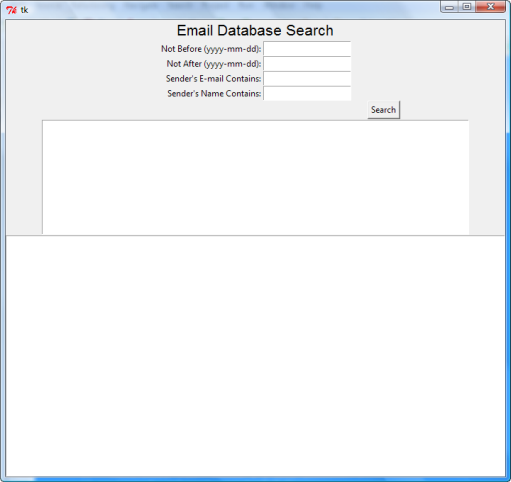
This particular application offers four search field entries: two for the minimum and maximum dates, one for the email address, and one for the name. We'll place these with appropriate labels on a four-by-two grid, with the labels right-justified and the entry widgets left-justified. We'll add a button to trigger the search to the second column in the fifth row, and the final two rows will hold a listbox and a text widget.
In the EmailSearch/src folder, create mailgui.py as shown:
from tkinter import *
from maildb import msgs
import datetime

class Application(Frame):

    def __init__(self, master=None):
        """
        Establish the window structure, leaving some widgets accessible
        as app instance variables.
        """
        Frame.__init__(self, master)
        self.master.rowconfigure(0, weight=1)
        self.master.columnconfigure(0, weight=1)
        self.grid(sticky=W+E+N+S)

        l0 = Label(self, text="Email Database Search", font=("Helvetica", 16))
        l0.grid(row=0, column=1, columnspan=2)

        l1 = Label(self, text="Not Before (yyyy-mm-dd):")
        l1.grid(row=1, column=1, sticky=E+N+S)
        self.mindate = Entry(self)
        self.mindate.grid(row=1, column=2, sticky=W+N+S)

        l2 = Label(self, text="Not After (yyyy-mm-dd):")
        l2.grid(row=2, column=1, sticky=E+N+S)
        self.maxdate = Entry(self)
        self.maxdate.grid(row=2, column=2, sticky=W+N+S)

        l3 = Label(self, text="Sender's E-mail Contains:")
        l3.grid(row=3, column=1, sticky=E+N+S)
        self.addsearch = Entry(self)
        self.addsearch.grid(row=3, column=2, sticky=W+N+S)

        l4 = Label(self, text="Sender's Name Contains:")
        l4.grid(row=4, column=1, sticky=E+N+S)
        self.namesearch = Entry(self)
        self.namesearch.grid(row=4, column=2, sticky=W+N+S)

        button = Button(self, text="Search")
        button.grid(row=5, column=2)

        self.msgsubs = Listbox(self, height=10, width=100)
        self.msgsubs.grid(row=8, column=1, columnspan=2)

        self.message = Text(self, width=100)
        self.message.grid(row=9, column=1, columnspan=2)

if __name__ == "__main__":

    root = Tk()
    app = Application(master=root)
    app.mainloop()
When you run this code, you see a GUI that looks like this—as promised, ugly but functional:
With the interface rendering properly as a window on the screen, now we need to plug in the "works." First, we'll add a search routine to run when the Search button is clicked. It should perform a search and populate the Listbox with the subject lines of each message.
The maildb.msgs search function does not require all arguments, but we want to be able to search on all of them, we'll provide them all. We'll arrange for the value None to be presented whenever the user's Entry is empty.
Dates are just a little trickier. We'll add a simple conversion function, and require that the user enters dates as "YYYY-MM-DD." It isn't particularly user-friendly to require such closely-formatted entries, but we can improve that later if necessary. The function converts those strings into a datetime.date object for passing to maildb.msgs().
The main addition is the search_mail() method, which does all the necessary preparation and finally calls maildb.msgs() to retrieve the specified messages and display the subject header value of each in a Listbox. We trigger the instance's search_mail() method by adding it as the command configuration parameter to the Button's creation. The search_mail() method is also called at startup, before the window is displayed. Modify mailgui.py as shown:
from tkinter import *
from maildb import msgs
import datetime

def get_date(s):
    """
    Assumes a date of form yyyy-mm-dd, returns a corresponding datetime.date.
    """
    syear = s[:4]
    smonth = s[5:7]
    sday = s[8:]
    return datetime.date(int(syear), int(smonth), int(sday))

class Application(Frame):

    def __init__(self, master=None):
        """
        Establish the window structure, leaving some widgets accessible
        as app instance variables.
        as app instance variables. Connect button clicks to search_mail
        method.
        """
        Frame.__init__(self, master)
        self.master.rowconfigure(0, weight=1)
        self.master.columnconfigure(0, weight=1)
        self.grid(sticky=W+E+N+S)

        l0 = Label(self, text="Email Database Search", font=("Helvetica", 16))
        l0.grid(row=0, column=1, columnspan=2)

        l1 = Label(self, text="Not Before (yyyy-mm-dd):")
        l1.grid(row=1, column=1, sticky=E+N+S)
        self.mindate = Entry(self)
        self.mindate.grid(row=1, column=2, sticky=W+N+S)

        l2 = Label(self, text="Not After (yyyy-mm-dd):")
        l2.grid(row=2, column=1, sticky=E+N+S)
        self.maxdate = Entry(self)
        self.maxdate.grid(row=2, column=2, sticky=W+N+S)

        l3 = Label(self, text="Sender's E-mail Contains:")
        l3.grid(row=3, column=1, sticky=E+N+S)
        self.addsearch = Entry(self)
        self.addsearch.grid(row=3, column=2, sticky=W+N+S)

        l4 = Label(self, text="Sender's Name Contains:")
        l4.grid(row=4, column=1, sticky=E+N+S)
        self.namesearch = Entry(self)
        self.namesearch.grid(row=4, column=2, sticky=W+N+S)

        button = Button(self, text="Search", command=self.search_mail)
        button.grid(row=5, column=2)

        self.msgsubs = Listbox(self, height=10, width=100)
        self.msgsubs.grid(row=8, column=1, columnspan=2)

        self.message = Text(self, width=100)
        self.message.grid(row=9, column=1, columnspan=2)

    def search_mail(self):
        """
        Take the database search parameters provided by the user
        (trying to make sense of the dates) and select the appropriate
        messages from the database, displaying the subject lines of the
        messages in a scrolling selection list.
        """
        mindate = self.mindate.get()
        if not mindate:
            mindate = None
        else:
            mindate = get_date(mindate)
        maxdate = self.maxdate.get()
        if not maxdate:
            maxdate = None
        else:
            maxdate = get_date(maxdate)
        addsearch = self.addsearch.get()
        if not addsearch:
            addsearch = None
        namesearch = self.namesearch.get()
        if not namesearch:
            namesearch = None
        self.msglist = msgs(mindate=mindate, maxdate=maxdate, addsearch=addsearch, namesearch=namesearch)
        self.msgsubs.delete(0, END)
        for pk, msg in self.msglist:
            self.msgsubs.insert(END, msg['subject'])

if __name__ == "__main__":

    root = Tk()
    app = Application(master=root)
    app.search_mail()
    app.mainloop()
Now we have a program that will list the subject lines of the messages that meet the search criteria. By default, you'll see whatever content is in the database (which is usually whatever was left by the last test in the messages table). So the window looks more or less the same when you run it as it did before, except that you see messages listed in the Listbox.
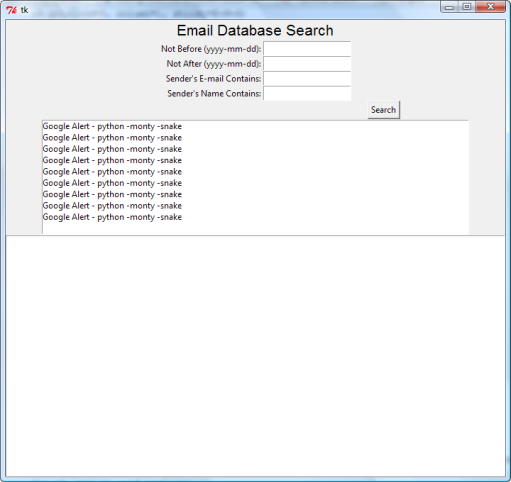
The final step is to connect a double-click on a Listbox entry to display the content of that message in the Text widget at the bottom of the window. Again, the code changes are fairly straightforward. The required double-click event is bound to the new display_mail() method, and the method extracts the selection from the Listbox and deletes any existing content from the Text widget. Then it inserts up to three headers, followed by a blank line and the body of the messages (unless it happens to be a multipart message—those are a little trickier to handle). Modify mailgui.py as shown:
from tkinter import *
from maildb import msgs
import datetime

def get_date(s):
    """
    Assumes a date of form yyyy-mm-dd, returns a corresponding datetime.date.
    """
    syear = s[:4]
    smonth = s[5:7]
    sday = s[8:]
    return datetime.date(int(syear), int(smonth), int(sday))

class Application(Frame):

    def __init__(self, master=None):
        """
        Establish the window structure, leaving some widgets accessible
        as app instance variables. Connect button clicks to search_mail
        method and subject double-clicks to display_mail method.
        """
        Frame.__init__(self, master)
        self.master.rowconfigure(0, weight=1)
        self.master.columnconfigure(0, weight=1)
        self.grid(sticky=W+E+N+S)

        l0 = Label(self, text="Email Database Search", font=("Helvetica", 16))
        l0.grid(row=0, column=1, columnspan=2)

        l1 = Label(self, text="Not Before (yyyy-mm-dd):")
        l1.grid(row=1, column=1, sticky=E+N+S)
        self.mindate = Entry(self)
        self.mindate.grid(row=1, column=2, sticky=W+N+S)

        l2 = Label(self, text="Not After (yyyy-mm-dd):")
        l2.grid(row=2, column=1, sticky=E+N+S)
        self.maxdate = Entry(self)
        self.maxdate.grid(row=2, column=2, sticky=W+N+S)

        l3 = Label(self, text="Sender's E-mail Contains:")
        l3.grid(row=3, column=1, sticky=E+N+S)
        self.addsearch = Entry(self)
        self.addsearch.grid(row=3, column=2, sticky=W+N+S)

        l4 = Label(self, text="Sender's Name Contains:")
        l4.grid(row=4, column=1, sticky=E+N+S)
        self.namesearch = Entry(self)
        self.namesearch.grid(row=4, column=2, sticky=W+N+S)

        button = Button(self, text="Search", command=self.search_mail)
        button.grid(row=5, column=2)

        self.msgsubs = Listbox(self, height=10, width=100)
        self.msgsubs.grid(row=8, column=1, columnspan=2)
        self.msgsubs.bind("<Double-Button-1>", self.display_mail)

        self.message = Text(self, width=100)
        self.message.grid(row=9, column=1, columnspan=2)

    def search_mail(self):
        """
        Take the database search parameters provided by the user
        (trying to make sense of the dates) and select the appropriate
        messages from the database, displaying the subject lines of the
        messages in a scrolling selection list.
        """
        mindate = self.mindate.get()
        if not mindate:
            mindate = None
        else:
            mindate = get_date(mindate)
        maxdate = self.maxdate.get()
        if not maxdate:
            maxdate = None
        else:
            maxdate = get_date(maxdate)
        addsearch = self.addsearch.get()
        if not addsearch:
            addsearch = None
        namesearch = self.namesearch.get()
        if not namesearch:
            namesearch = None
        self.msglist = msgs(mindate=mindate, maxdate=maxdate, addsearch=addsearch, namesearch=namesearch)
        self.msgsubs.delete(0, END)
        for pk, msg in self.msglist:
            self.msgsubs.insert(END, msg['subject'])

    def display_mail(self, event):
        """
        Display the message corresponding to the subject line that the
        user just clicked on.
        """
        indexes = self.msgsubs.curselection()
        if len(indexes) != 1:
            return
        self.message.delete(1.0, END)
        pk, msg = self.msglist[int(indexes[0])]
        for header_name in "Subject", "Date", "From":
            hdr = msg[header_name]
            if hdr:
                self.message.insert(INSERT, "{0}: {1}\n".format(header_name, hdr))
        self.message.insert(END, "\n")
        if msg.is_multipart():
            self.message.insert(END, "MULTIPART MESSAGE - SORRY!")
        self.message.insert(END, msg.get_payload())

if __name__ == "__main__":

    root = Tk()
    app = Application(master=root)
    app.search_mail()
    app.mainloop()
When you run this modified code, you see the final (but not necessarily complete) form of our GUI-based mail retrieval program. It searches messages by date range, sender name, and email address, and allows you to view any message in the search results by double-clicking the message subject. This sort of code might be considered "alpha quality"—it can be released for testing purposes, but it's not quite ready for prime time.
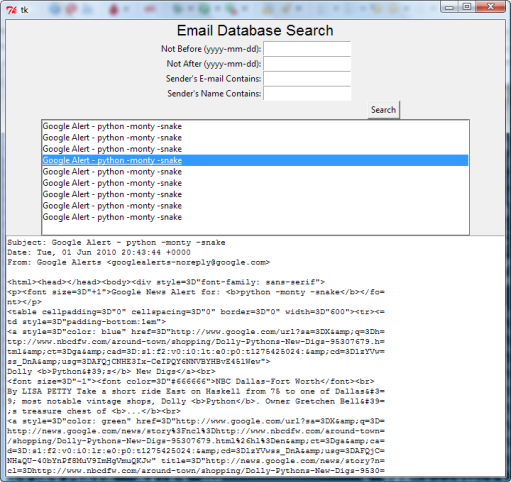
The appearance of the interface could be improved, but the program's basic design is sound. The program is constructed plainly, and we can see how to extend it in various ways.
For example, if you wanted to add subject search features, it's pretty clear that you'd need to add an msgSubject column to the message table and therefore to the logic of maildb.store(). The interface to maildb.msgs() would need to be augmented by a subjectsearch argument, and the GUI would need to add another Entry element to capture the user's search string. Fortunately, this program is logically organized, and you should be able to proceed with confidence.
| Modern Python | The display_mail method calls msg.get_payload(), which returns a
string for a simple (non-multipart) message but a list of Message parts for a multipart one.
Using policy=email.policy.default at parse time gives you an EmailMessage
instead, which provides .get_body(preferencelist=('plain',)) to extract the preferred text
part and .iter_attachments() to handle attachments cleanly — making the multipart guard
in this code unnecessary for most real-world cases. |
Open a Python console and enter the commands below as shown:
>>> import maildb
>>> help(maildb)
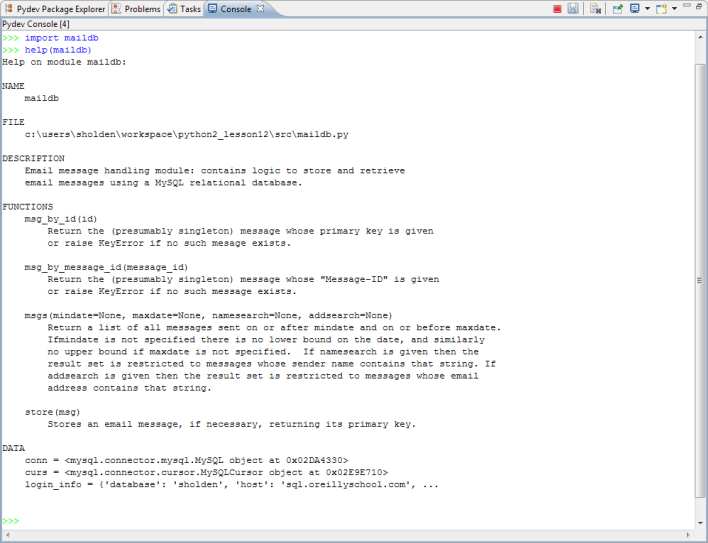
The Python help system uses all of the docstrings you've put into your code to produce a brief description of your maildb module.
Congratulations! Your hard work is really paying off. You've powered through all of the challenges we've thrown at you and arrived at the finish line of this second O'Reilly School of Technology Python course. Your command of the language is astounding! You can integrate databases and graphical user interfaces, and you're prepared to explore the bigger Python landscape. Now let's put those skills to work in your final project! It's been a real pleasure working with you. See you in the next course!