
Getting started
This walks from nothing to a JSON extract and an HTML report, using a sample workbook that ships with EDJAS. It takes about ten minutes.
1. Install
pip install edjas
That gives you the edjas command and the library. To render HTML reports as well, and to
get the seven worked examples, install the demo extra instead:
pip install edjas[demo]
2. The sample workbook
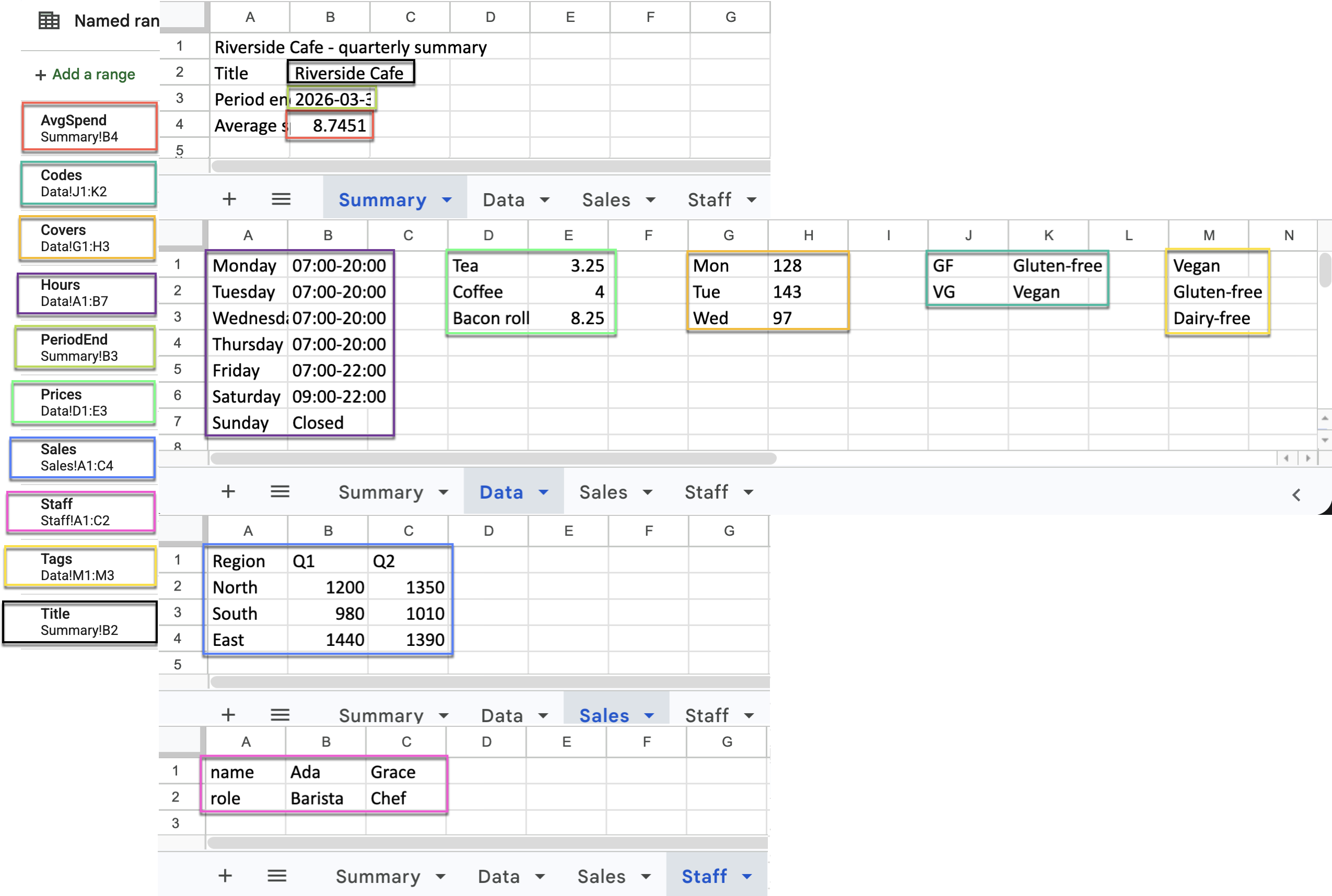
The repository ships examples/example.xlsx, a small café report spread over four sheets.
Its named ranges cover every shape you are likely to meet:
| Named range | Where | Shape |
|---|---|---|
Title, PeriodEnd, AvgSpend |
Summary!B2:B4 |
single cells |
Hours, Prices, Covers, Codes |
Data |
two-column name/value ranges |
Tags |
Data!M1:M3 |
a single column |
Sales |
Sales!A1:C4 |
a table with a heading row |
Staff |
Staff!A1:C2 |
one field per row, so it needs transposing |
Here is the workbook itself, with each named range shaded in a colour:
3. Write a specification
Create first.toml next to the workbook:
[extract]
title = "Title"
tags  = "[Tags]"
hours = "{Hours}"
Three keys, one per form: a scalar, a list and an object.
4. Run it
edjas examples/example.xlsx first.toml
{
  "title": "Riverside Cafe",
  "tags": ["Vegan", "Gluten-free", "Dairy-free"],
  "hours": {"Monday": "07:00-20:00", "...": "...", "Sunday": "Closed"}
}
The workbook has not been touched — it was opened read-only and closed again.
5. Reshape on the way out
Raw ranges are rarely the shape you want. Append a pipeline to reshape as you extract:
[extract]
sales   = "[Sales | records]"              # rows become objects, keyed by the header row
staff   = "[Staff | transpose | records]"  # fields-down-the-page, so transpose first
covers  = "{Covers | int}"                 # this sheet holds its numbers as text
average = "AvgSpend | round 2"             # 8.75, from a cell holding 8.7451
period  = "PeriodEnd | isodate"            # "2026-03-31"
6. The whole thing
examples/example.toml is a worked specification exercising every construct, and it is
reproduced here in full — this is the actual file, not a copy of it:
# Sample EDJAS spec: one entry for every construct the README describes.
# Run it with:  edjas examples/example.xlsx examples/example.toml

[extract]

# --- the three extraction forms ------------------------------------------
title = "Title"                        # bare ref  -> scalar
tags = "[Tags]"                        # [ ]       -> list
hours = "{Hours}"                      # { }       -> object

# --- ways of writing a reference -----------------------------------------
title_again = "B2"                     # A1 cell on the active sheet
prices = "{Data!D1:E3}"                # sheet-qualified A1 range

# --- reshaping a table ----------------------------------------------------
sales_rows = "[Sales]"                 # rows, as they sit in the sheet
sales_records = "[Sales | records]"    # header row -> a list of objects
sales_columns = "[Sales | columns]"    # header row -> an object of columns
sales_transposed = "[Sales | transpose]"
staff_flat = "[Staff | flatten]"

# --- chaining -------------------------------------------------------------
staff = "[Staff | transpose | records]"

# --- object functions -----------------------------------------------------
price_list = "{Prices | keys}"
price_values = "{Prices | values}"
price_items = "{Prices | items}"
code_names = "{Codes | invert}"

# --- coercion and formatting ----------------------------------------------
covers = "{Covers | int}"              # text-held numbers -> integers
covers_float = "{Covers | float}"
prices_as_text = "{Prices | str}"
average_spend = "AvgSpend | round 2"   # a built-in taking an argument
spend_rounded = "AvgSpend | round"     # digits defaults to 2
spend_whole = "AvgSpend | round 0"
period_ending = "PeriodEnd | isodate"
period_raw = "PeriodEnd"               # serialised as ISO-8601 anyway
Run it against the workbook to see all of it at once:
edjas examples/example.xlsx examples/example.toml
7. Render a report
Extraction gives you data; the optional reporting layer turns it into a document. It needs
Jinja2, which arrives with the demo extra.
from edjas import render_report

html = render_report(
    "examples/example.xlsx", "examples/example.toml",
    template="report.html", templates_dir="templates",
)
The extracted dictionary reaches the template as data, and any extra keyword arguments
become further template variables. Rendering only reads the workbook, exactly as plain
extraction does.
Where next
- The gallery applies all of this to seven real government workbooks, with the reports they produce.
- The specification language covers references, quoting and formula cells in full.
- The Python API covers
read_spec,render_reportand supplying your own functions.