
Converting Data into Structured Objects
In the previous courses, we've touched on various methods of structuring data. Iterators such as lists and tuples have their place, as does the dict. The clever usage of these fundamental structural elements in Python is a defining hallmark of a skilled developer.
Sometimes, though, you need objects that behave in different ways. Assigning one behavior to the data such as 'render to CSV' can be easy. But what if you have a dozen behaviors to consider? What if you need to include behaviors such as 'print prettily to the screen, sum up the integer values, add an ISBN from the O'Reilly bookstore', and a dozen more operations?
You could use your list, tuple, or dict structures in combination with a dozen functions to create the functionality you need. However, that isn't very portable, as remembering to import all your functions across multiple modules is error-prone and time-consuming. Really what you are looking for is a way to carry the functions around with the data, making them really easy to apply.
This means it's time for us to revisit object oriented programming. With a little bit of work, you can apply a sound structure to incoming data. Applying this sound structure to your data can provide a number of positive benefits. Since the data is in a predictable format, you can more easily write code to support the data. The structure can also be assigned behaviors, which can be applied to the data. All the behaviors are defined in a class definition, making them readily available to all instances of the class.
If you document the expected structure of the data you expect to receive, you are providing an interface for yourself to follow in the future. The wonderful thing is that Python gives you the tools to easily create interfaces that are easy to understand, flexible, and very powerful.
This lesson includes the following sections:
In previous courses and lessons, we learned how to write classes and create objects. We also learned about the __init__() special constructor method used each time an object is instantiated. Now, we'll learn a few more things about the __init__() method and things you can do to better handle behavior of data.
You may remember that instances of your classes normally keep their instance attribute values in a dict known as self.__dict__. Remind yourself with a quick interactive interpreter session.
>>> class Meter:
...     def __init__(self, voltage):
...         self.limit = voltage
...
>>> m1 = Meter(20)
>>> m1.label = "Apartment 2214"
>>> m1.__dict__
{'limit': 20, 'label': 'Apartment 2214'}
See how self.__dict__ implements the instance m1's local namespace? When we bind a value to the name "limit" in the instance's namespace with self.limit = voltage, a new key "limit" appears in the instance's __dict__, associated with the value "20." One of the reasons why namespaces seem so like dicts is that a dict is often used to implement a namespace.
Through the use of keyword arguments, Python gives us the ability to create a bunch class. A bunch class takes incoming data and saves it as attributes. That sounds more sophisticated than it is, so let's write a bunch class and see what it means. Create bunchclass.py as shown:
"""
Simple bunch class
"""

class Bunch(object):

    def __init__(self, **kwargs):
        self.__dict__.update(kwargs)

if __name__ == "__main__":
    b = Bunch(name="Python 3", language="Python 3.0.1")
    print(b.name)
    print(b.language)
    print(b.__dict__)
Save and run it.
Python 3
Python 3.0.1
{'name': 'Python 3', 'language': 'Python 3.0.1'}
You see the two values, "Python 3" and "Python 3.0.1," printed from the "name" and "language" attributes of the "b" object. But the Bunch class lacks those attributes!
Remember that instances keep their attributes in a dict-like object (named __dict__), and that the code guarded by if __name__ == "__main__": will only be executed if the module is run as a main program, and not when it is imported by some other program. In the latter case, you don't want print statements running in the middle of someone else's program!
Let's take a closer look:
"""
Simple bunch class
"""
class Bunch(object):
    def __init__(self, **kwargs):
        self.__dict__.update(kwargs)

if __name__ == "__main__":
    b = Bunch(name="Python 3", language="Python 3.0.1")
    print(b.name)
    print(b.language)
    print(b.__dict__)
This Bunch class uses the magic __dict__ attribute's update() method to dynamically add attributes to the object based according to the keyword arguments passed into the class. Note that the __init__() method's second argument is prefixed by "**", so keyword arguments are collected in a dict named kwargs. Calling __dict__'s update() method copies the keys and values from kwargs to __dict__.
| Note | In Python 3, when we define a class, we don't need to specify that it inherits from object, but it doesn't hurt to do so. We do it here just to remind you that the Bunch class is a child of the built-in object. |
All our code should have tests, even programs as seemingly simple as this. Convert the above program to use the unittest framework.
"""
Simple bunch class
"""
import unittest

class Bunch(object):

    def __init__(self, **kwargs):
        self.__dict__.update(kwargs)

class TestBunch(unittest.TestCase):

    def test_attributes(self):
        b = Bunch(name="Python 3", language="Python 3.0.1")
        self.assertEqual("Python 3", b.name)
        self.assertEqual("Python 3.0.1", b.language)

if __name__ == "__main__":
    b = Bunch(name="Python 3", language="Python 3.0.1")
    print(b.name)
    print(b.language)
    print(b.__dict__)

    unittest.main()
Save and run it.
.
----------------------------------------------------------------------
Ran 1 test in 0.000s

OK
The tests are small here, so it is OK to add them to the basic module rather than making a separate test module. The current code always imports the unittest module even when it is not going to be used (when the module is imported rather than running as a main program). You can correct this by moving both the import of unittest and the code for the test class itself so that these pieces of code are only executed when required:
""" Simple bunch class """import unittestclass Bunch(object): def __init__(self, **kwargs): self.__dict__.update(kwargs)class TestBunch(unittest.TestCase):def test_attributes(self):b = Bunch(name="Python 3", language="Python 3.0.1")self.assertEqual("Python 3", b.name)self.assertEqual("Python 3.0.1", b.language)if __name__ == "__main__":import unittest class TestBunch(unittest.TestCase): def test_attributes(self): b = Bunch(name="Python 3", language="Python 3.0.1") self.assertEqual("Python 3", b.name) self.assertEqual("Python 3.0.1", b.language) unittest.main()
While this works, it is really rather simpler to put the testing code into an entirely separate module that does not cause additional work when testing is not required. So we'll undo these modifications in a minute to keep the code in the remaining examples as straightforward as possible.
The bunch class is useful in handling incoming data, but what about sending it out? For example, what if we want to print all the data? A first approximation to that task could simply use print(b.__dict__), but the output is hardly user-friendly. You can easily add a method to the Bunch class.
"""
Simple bunch class with a pretty printing method
"""
import unittest

class Bunch(object):

    def __init__(self, *args, **kwargs):
        self.__dict__.update(kwargs)

    def pretty(self):
        text = ""
        for key, value in self.__dict__.items():
            text += "%s: %s\n" % (key, value)
        return text

class TestBunch(unittest.TestCase):

    def test_attributes(self):
        b = Bunch(name="Python 3", language="Python 3.0.1")
        self.assertEqual("Python 3", b.name)
        self.assertEqual("Python 3.0.1", b.language)

    def test_pretty(self):
        b = Bunch(name="Steve Holden", profession="Pythonista")
        p = b.pretty()
        self.assertTrue("name: Steve Holden" in p)
        self.assertTrue("profession: Pythonista" in p)
        self.assertEqual(len(p.splitlines()), 2, "Too many lines in output")

if __name__ == "__main__":

    unittest.main()
This version of the bunch class uses a pretty() method to display the attributes by accessing the object's magic __dict__ property. Calling this method renders the attributes of the instance—with each key, value pair printing as key: value. Of course adding a new method means adding tests for it too, so test_pretty() tries to verify that it is creating the expected output.
Run your tests again to verify that they both succeed:
..
----------------------------------------------------------------------
Ran 2 tests in 0.000s

OK
There is an issue with the updated Bunch class. It hasn't created any problems so far, but some interactive commands will make it clear:
>>> from bunchclass import Bunch
>>> b = Bunch(name="Audrey", job="Software Developer", pretty=True)
>>> b.pretty()
Traceback (most recent call last):
  File "<console>", line 1, in <module>
TypeError: 'bool' object is not callable
>>>
When we tried to call the b.pretty() method, we got a TypeError exception. This is because the argument pretty=True just overrode the pretty() method (remember: the interpreter looks for attributes in the instance's __dict__ before it looks in the class's __dict__), so the instance's pretty attribute is masking the class's pretty() method—the interpreter never gets around to looking in the class because it finds what it is looking for in the instance.
One solution is to use the built-in hasattr() and setattr() functions. Modify bunchclass.py to disallow masking of class attributes:
"""
Simple bunch class with a pretty printing method that protects its API.
"""

import unittest

class Bunch(object):

    def __init__(self, *args, **kwargs):
        self.__dict__.update(kwargs)

        for key, value in kwargs.items():
            if hasattr(self, key):
                raise AttributeError("API conflict: '%s' is part of the '%s' API" % (key, self.__class__.__name__))
            else:
                setattr(self, key, value)

    def pretty(self):
        text = ""
        for key, value in self.__dict__.items():
            text += "%s: %s\n" % (key, value)
        return text

class TestBunch(unittest.TestCase):

    def test_pretty(self):
        self.assertRaises(AttributeError, Bunch, name="Audrey", job="Software Developer", pretty=True)
        b = Bunch(name="Audrey", job="Software Developer")
        p = b.pretty()
        self.assertTrue("Audrey" in p)
        self.assertFalse("pretty: True" in p)


    def test_attributes(self):
        b = Bunch(name="Python 3", language="Python 3.0.1")
        self.assertEqual("Python 3", b.name)
        self.assertEqual("Python 3.0.1", b.language)

    def test_pretty(self):
        b = Bunch(name="Steve Holden", profession="Pythonista")
        p = b.pretty()
        self.assertTrue("name: Steve Holden" in p)
        self.assertTrue("profession: Pythonista" in p)
        self.assertEqual(len(p.splitlines()), 2, "Too many lines in output")

if __name__ == "__main__":

    unittest.main()
Run this program and see how the tests pass. Now, let's take a closer look at some of the code to understand what's going on.
class Bunch(object):
    def __init__(self, *args, **kwargs):
        for key, value in kwargs.items():
            if hasattr(self, key):
                raise AttributeError("API conflict: '%s' is part of the '%s' API" % (key, self.__class__.__name__))
            else:
                setattr(self, key, value)
    def pretty(self):
        text = ""
        for key, value in self.__dict__.items():
            text += "%s: %s\n" % (key, value)
        return text
The __init__ method uses the kwargs items() method which it gets for being of type dict to pass an iterable of keys and values that are tested for presence in the self object via the hasattr built-in. If the attribute doesn't exist yet, the setattr built-in is used to add the attribute. If the attribute does exist, we raise an AttributeError, which is used to identify when attribute assignment or references fail.
Python gives you the power to change the attributes of class objects almost at will. This is because Python makes the assumption that you are a "consenting adult" and understand the ramifications of what you do. This may sound a bit intimidating but this sort of confidence in the people who want to use Python is a hallmark of the language and the community that surrounds the language.
| Note | Certain applications—such as the control of nuclear reactors, flight control systems, and the like—require the ability to reason about program structures as a part of integrity verification. Dynamic languages like Python would require analysis that is too complex to be practical at today's state of the art. |
| Modern Python | The Bunch pattern is a useful exercise, but Python now ships with
lighter-weight alternatives for making named-field record types. collections.namedtuple
creates an immutable tuple subclass with named fields:
from collections import namedtuple
Point = namedtuple('Point', ['x', 'y'])
p = Point(1, 2)
print(p.x, p.y)
typing.NamedTuple (Python 3.6+) adds type annotations and supports defaults:
from typing import NamedTuple
class Point(NamedTuple):
    x: float
    y: float = 0.0
dataclasses.dataclass (Python 3.7+) gives you a mutable class with auto-generated
__init__, __repr__, and optional __eq__:
from dataclasses import dataclass
@dataclass
class Point:
    x: float
    y: float = 0.0
For a Bunch-style "accept any keyword args" bag, a dataclass with **kwargs is
overkill; a plain namespace works well: from types import SimpleNamespace and then
SimpleNamespace(name="Python 3", language="Python 3.0.1"). |
Suppose you wrote some software that lets you calculate something important, such as the speed of small birds tasked with carrying objects in a basket. This program would let an individual add and remove objects for the bird to carry, and when unladen it would simply go faster. You want to share this software with others, and to encourage its use, you want to make it easy for them to use.
The way this is done is through an Application Programming Interface, or API. An API refers to a specified interface between components, and allows us to build applications that use already existing software (and sometimes hardware). Sophisticated APIs drive our modern world and make it possible to send/receive email or text messages, take O'Reilly Software Courses, use on-line mapping tools, and a million other tasks. As a designer, your desire is to hide the complexity you have programmed into the classes from your users, who simply call API functions (and classes).
You will use what you learned in creating Bunch classes to build a simple API.
The first step in designing an API is to figure out what data it should handle and what behaviors it should have. Our API should have the following capabilities:
- initialize: Gives the user the ability to create a Bird object carrying any number of small objects in its basket.
- add: Add another object for the Bird to carry in its basket.
- remove: Remove an object from the Bird's basket
- calculate: Calculate the bird's current speed.
- basket: Return an attractive string that lists the materials in the basket.
Does this look very similar to how you have designed Python classes in the past? It should, because the preferred method in API design is to follow an object-oriented approach. This lets people find data represented by an object and then call behaviors and methods to act upon that data. Importing the class and creating instances automatically gives other programmers access to the API you have designed.
We've got enough information to lay out the skeleton code for our API. Since the Bunch class already embodies a lot of the functionality we need, we'll subclass the Bunch class, allowing us to build on existing code. The bird API specification (which is what the following code essentially comprises) goes in a new file, bird_api.py:
"""
API for software birds carrying objects.
"""
from bunchclass import Bunch

class Bird(Bunch):

    def add(self, name, value):
        """
        Add an object for the Bird to carry in its basket.
            Name is a string naming the object
            Value is the actual object being placed in the basket.
        """

    def remove(self, name):
        """
        Remove an object from the basket
            name is the string of the object to be removed
        """

    def calculate(self):
        """
        Calculate the speed of the bird.
            algorithm: 100 - (5*number of objects in the basket)
            result cannot be less than zero.
        """

    def basket(self):
        """
        Print in an attractive format the list of objects in the basket.
        """

if __name__ == "__main__":
    swallow = Bird(fruit=("coconut", "orange"), drink="apple juice")
    swallow.add("cars", 3)
    print(swallow.basket())
    print(swallow.calculate())
    swallow.remove("drink")
    print(swallow.basket())
    print(swallow.calculate())
    help(swallow)
Save and run it. You'll get nothing as a result except a bunch of Nones and the output from the help(). The help output is really critical because it allows you to view your software through the eyes of another programmer. This other guy or girl doesn't know any of the great stuff about your software that you do, so they will likely read the help to find out how to use your software—and whether they might want to. APIs without quality documentation are functionally impossible to use. Also, writing the documentation in an API you are providing can help you clean up the design.
If you have defined a module correctly, everything important in it should be documented. You should be able to verify this from the console window after running bird_api. Alternatively you can access the help from an interactive console session.
>>> import bird_api
>>> help(bird_api.Bird)
Help on class Bird in module bird_api:

class Bird(bunchclass.Bunch)
 |  Method resolution order:
 |      Bird
 |      bunchclass.Bunch
 |      builtins.object
 |
 |  Methods defined here:
 |
 |  add(self, name, value)
 |      Add an object for the Bird to carry in its basket.
 |          Name is what you call the object
 |      Value is the actual object being placed in the basket.
 |
 |  basket(self)
 |      Print in an attractive format the list of objects in the basket.
 |
 |  calculate(self)
 |      Calculate the speed of the bird.
 |          algorithm: 100 - (number of objects in the basket * 10) minimum of 0
 |          result cannot be less than zero.
 |
 |  remove(self, name)
 |      Remove an object from the basket
 |          Name is the string of the object to be removed
 |
 |  ----------------------------------------------------------------------
 |  Methods inherited from bunchclass.Bunch:
 |
 |  __init__(self, *args, **kwargs)
 |
 |  pretty(self)
 |
 |  ----------------------------------------------------------------------
 |  Data descriptors inherited from bunchclass.Bunch:
 |
 |  __dict__
 |      dictionary for instance variables (if defined)
 |
 |  __weakref__
 |      list of weak references to the object (if defined)
Note that there is no need for individual method descriptions anywhere except in the docstring for that method. The help system collects all that information together for the user in one convenient place.
Now that our API is documented, let's add the behavior code in each method:
"""
API for software birds carrying objects.
"""
from bunchclass import Bunch

class Bird(Bunch):

    def add(self, name, value):
        """
        Add an object for the Bird to carry in its basket.
            Name is what stringyou ncamingll the object
            Value is the actual object being placed in the basket.
        """
        if hasattr(self, name):
            raise KeyError("'%s' object cannot be placed in basket")
        else:
            setattr(self, name, value)

    def remove(self, name):
        """
        Remove an object from the basket
            nName is the string of the object to be removed
        """
        if name in self.__dict__:
            delattr(self, name)
        else:
            raise KeyError("'%s' object not found in basket")

    def calculate(self):
        """
        Calculate the speed of the bird.
            algorithm: 100 - (5*number of objects in the basket * 10) minimum of 0
            result cannot be less than zero.
        """
        return max(100 - len(self.__dict__) * 10, 0)


    def basket(self):
        """
        Print in an attractive format the list of objects in the basket.
        """
        return "Basket Objects\n" + self.pretty()


if __name__ == "__main__":
    swallow = Bird(fruit=("coconut", "orange"), drink="apple juice")
    swallow.add("cars", 3)
    print(swallow.basket())
    print(swallow.calculate())
    swallow.remove("drink")
    print(swallow.basket())
    print(swallow.calculate())
    help(swallow)
Save and run it. We now have a working class that stores data in a structured format and has assigned behaviors to it. The documentation is such that you can easily figure out what is going on, making it possible to call it from other programs for a variety of uses. Suppose someone needed to model a flock of birds carrying objects from one location to another (perhaps they plan to start a courier service based on bird power).
A good aphorism for API work is "A good API is simply code, and code that is documented to the best of your ability." No one is going to want to use your API if all you do is provide a list of methods that you think is intuitive. Accurate and complete documentation is a hallmark of successful API design. Python's docstrings are a great tool for sharing your code.
There are a number of common ways to share an API. While outside the scope of this class, one of the more accessible methods is via the Internet. A very current example is the ability of social networking sites to provide cross-site login controls via an API called OpenID (http://en.wikipedia.org/wiki/OpenID). These more sophisticated APIs require the use of various modules taken from the Python standard library such as urllib, ftplib, smtplib, and more.
However, an API can also be called via simple object instantiation inside of code. In fact, this is the first method of testing done against an API during design. The Unit Tests with which you are familiar are commonly used in testing API designs and code.
In this section, we'll just call the API by importing the Bird class into a new program and using it. This is the most common way of using an API, and builds on what you already know. Create a new program named flock.py as shown:
from bird_api import Bird

class Flock(object):

    birds = []

    def add_bird(self, bird):
        """
        Add a bird object to the flock
        """
        self.birds.append(bird)

    def race(self):
        """
        Show how far the birds of the flock can go in one hour carrying their respective loads.
        """
        print("Distance flown in one hour by the flock")
        for bird in self.birds:
            distance = "-" * (bird.calculate() // 10)
            notice = "%s: %s carrying %s items" % (distance, bird.name, len(bird.__dict__))
            print(notice)

if __name__ == "__main__":
    swallow = Bird(coconut=1, name="Swallow")
    african = Bird(coconut=1, piece="of string", visited=False, name="African Swallow")
    european = Bird(coconut=1, lottery_numbers=(23, 12, 34), piece="of string", visited=True, name="European Swallow")
    european.add("cereal_boxes", 5)
    european.add("Norway", True)
    european.add("England", True)

    flock = Flock()
    flock.add_bird(swallow)
    flock.add_bird(african)
    flock.add_bird(european)
    flock.race()
In this API example, we import the Bird class from the bird_api module and call it to create a number of birds (Bird instances). We add the birds to our flock object and race them against each other. When you run the program the output clearly shows that the least-heavily laden swallow travels farthest.
Distance flown in one hour by the flock
--------: Swallow carrying 2 items
------: African Swallow carrying 4 items
--: European Swallow carrying 8 items
We use the API objects without modification, and only add attributes via the specified methods of the API. This is really important because Python is a very dynamic language that allows you many freedoms. You can break the API by replacing critical methods "from outside," as we found earlier in the case of the simple Bunch class.
There, the code triggered a TypeError exception because the Bunch class's pretty() method was masked by a data attribute on the instance, which we then attempted to call. While the Bunch class now protects this from happening during object instantiation, there is nothing to prevent you from masking the pretty() method simply by setting bunch.pretty = True after creating an instance.
Therefore, when using an object or value returned by an API, it is a good practice to use only the object's methods to modify its data (unless the documentation specifically gives you leave to change attribute values). To add further data, incorporate the objects into some other structure containing the associated information, as in the modification to flock.py shown below:
from bird_api import Bird

class Flock(object):

    birds = []

    def add_bird(self, bird):
        """
        Add a bird object to the flock
        """
        self.birds.append(bird)

    def race(self):
        """
        Show how far the birds of the flock can go in one hour carrying their respective loads.
        """
        print("Distance flown in one hour by the flock")
        for bird in self.birds:
            distance = "-" * (bird.calculate() // 10)
            notice = "%s: %s carrying %s items" % (distance, bird.name, len(bird.__dict__))
            print(notice)

if __name__ == "__main__":
    swallow = Bird(coconut=1, name="Swallow")
    african = Bird(coconut=1, piece="of string", visited=False, name="African Swallow")
    european = Bird(coconut=1, lottery_numbers=(23, 12, 34), piece="of string", visited=True, name="European Swallow")
    european.add("cereal_boxes", 5)
    european.add("Norway", True)
    european.add("England", True)


    birds = (
        ("Swallows are a group of birds in the family Hirundinidae.", swallow),
        ("African swallows are said to be able to carry coconuts.", african),
        ("European swallows are said to have trouble carrying coconuts.", european),
    )

    flock = Flock()
    flock.add_bird(swallow)
    flock.add_bird(african)
    flock.add_bird(european)

    for stmt, bird in birds:
        print(stmt)
        flock.add_bird(bird)
    print("*"*40)
    flock.race()
Save and run it. You should see something like this:
Swallows are a group of birds in the family Hirundinidae.
African swallows are said to be able to carry coconuts.
European swallows are said to have trouble carrying coconuts.
****************************************
Distance flown in one hour by the flock
--------: Swallow carrying 2 items
------: African Swallow carrying 4 items
-----: European Swallow carrying 5 items
In this example, you used tuples to store some extra information along with the new bird objects. You didn't modify the existing API objects and so could be secure that the results would not throw an exception. Tuples are a valuable way to save associated data, since you know that no other portion of the code can modify the tuple because of its immutable nature.
Let's think about a small family. For the sake of brevity we'll use "parent" instead of "mother" or "father," and "child" instead of "son" or "daughter." What we have then is a family consisting of a parent and child. The parent has certain features such as hair color and voice. The child when grown will have similar features to those of its parent. However, children generally have more than one parent, and their parents have parents, and so on. Determining the features the child inherits becomes complicated very rapidly—more so as you add in the unpredictability of genetics. Also, the child can modify their appearance and voice. Maybe they dye their hair or scream too much at concerts and their voice is altered. Now they have some features different from any of their ancestors.
In programming, names of familial relationships are used to describe similar relationships among object classes. Inheritance, parent, and child are frequently used to describe the elements of object inheritance. One noticeable difference in terminology is that instead of "features," object inheritance tracks the behaviors we call methods.
Another important difference is that programmatic inheritance does not have any genetic variety, instead being fixed and static. Programmers tend to prefer this: while life may lack interest without the rich profusion of genetic mutation, it does have a certain predictability which is welcome when thinking about what is actually happening in a program.
If you explore some of the previous code in this lesson, you can see the inheritance relationship between the Bunch and Bird classes:
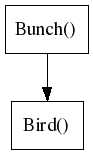
Bunch is the parent of Bird, and Bird is the child of Bunch. Bird has all the methods of Bunch. We call the Bunch __init__() method when we instantiate a Bird object and the pretty() methods when we test the results of the Bird class.
Let's change the Bird's pretty() method. Bird is vain so instead of displaying its attributes we'll have the pretty() method return "pretty bird". In order to do this, all we need to do is add a new pretty() method to the Bird class to override what it inherited from the Bunch class:
"""
API for software birds carrying objects.
"""
from bunchclass import Bunch

class Bird(Bunch):

    def pretty(self):
        """
        Replacement pretty() method
        """
        return "pretty bird!"

    def add(self, name, value):
        """
        Add an object for the Bird to carry in its basket.
            Name is what you call the object
        Value is the actual object being placed in the basket.
        """
        if hasattr(self, name):
            raise KeyError("'%s' object cannot be placed in basket")
        else:
            setattr(self, name, value)

    def remove(self, name):
        """
        Remove an object from the basket
            Name is the string of the object to be removed
        """
        if name in self.__dict__:
            delattr(self, name)
        else:
            raise KeyError("'%s' object not found in basket")

    def calculate(self):
        """
        Calculate the speed of the bird.
            algorithm: 100 - (number of objects in the basket * 10) minimum of 0
            result cannot be less than zero.
        """
        return max(100 - len(self.__dict__) * 10, 0)


    def basket(self):
        """
        Print in an attractive format the list of objects in the basket.
        """
        return "Basket Objects\n" + self.pretty()


if __name__ == "__main__":
    swallow = Bird(fruit=("coconut", "orange"), drink="apple juice")
    swallow.add("cars", 3)
    print(swallow.basket())
    print(swallow.calculate())
    swallow.remove("drink")
    print(swallow.basket())
    print(swallow.calculate())
Save and run it. Instead of "fruit: ('coconut', 'orange')" you'll get "pretty bird!".
Basket Objects
pretty bird!
70
Basket Objects
pretty bird!
80
To summarize, if a child class inherited a method from its parent class, you can override that inherited method by adding a method of the same name to the child class.
Let's continue with the family analogy. Regardless of the marital status, the child has two immediate genetic donors known by the common vernacular as "mother" and "father," or collectively as "parents." Those parents have parents of their own. Python lets you model this sort of genetic structure (and many others). With that in mind, let's model the hair color of the following inheritance structure:
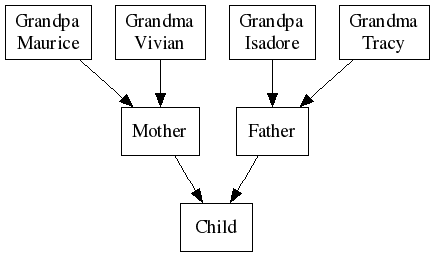
Let's assume that we all have four different grandparents with four different hair colors—except Grandpa Isadore, who went bald early. Python gives precedence to the leftmost inherited object; to see what the child ends up with, create inhairitance.py and test_inhairitance.py as shown:
"""
Complex inheritance program
"""

import unittest

class Maurice(object):

    def hair(self):
        return "red"

class Vivian(object):

    def hair(self):
        return "brown"

class Isadore(object):

    def hair(self):
        return "bald"

class Tracy(object):

    def hair(self):
        return "gray"

class Mother(Maurice, Vivian):
    pass

class Father(Isadore, Tracy):
    pass

class Child(Father, Mother):
    pass

if __name__ == "__main__":
    child = Child()
    print(child.hair())
"""
Inheritance test program
"""

import unittest
from inhairitance import Child

class TestHair(unittest.TestCase):

    def test_hair(self):
        child = Child()
        hair = child.hair()
        self.assertNotEqual(hair, "red")
        self.assertNotEqual(hair, "brown")
        self.assertNotEqual(hair, "gray")
        self.assertEqual(hair, "bald")

if __name__ == "__main__":
    unittest.main()
Save and run it. We can deduce by the fact that the tests succeed that the child's hair is "bald." This is because the method resolution order tries the "base classes" in its search for a method from left to right (in the order they are given in the class statement). Thus a method for child will be sought first in Father, then in Mother. Father, of course, has no hair() method, and so its base classes are searched, again in left-right order. This is known as a left-first depth-first search.
If you switch the order of inheritance, say, Mother with Father, the child will have red hair. Indeed, if genetics were as straightforward as programming in Python, a lot more people would be happy with their hair—except maybe Grandpa Isadore.
In any case, most of the time when you program, all you need is single inheritance and method resolution order in Python is pretty straightforward. Inheritance is a powerful tool but it can get complicated rather quickly. It is a good practice to keep inheritance as simple as possible with clearly named classes. If things get too complicated for simple inheritance, there are other tools you can wield from the programming armory to solve those problems.
Python has two built-in functions that can help you in determining whether your code has been provided with values of a particular type. Note that this should not be a frequent requirement of your code, but it is sometimes justifiable usage.
issubclass(cls, classinfo) returns True if the object passed as cls is a direct or indirect subclass of one of the classes specified by classinfo. This second argument can either be a single class or a tuple of classes. In the latter case the result is True if cls is a subclass of any of the classes in the tuple. An indirect subclass of a class is a subclass of the class or one if its subclasses. For the purposes of issubclass() all classes are regarded as subclasses of themselves.
isinstance(obj, classinfo) returns True if the obj argument is an instance of some class that is a subclass of one of the classes specified by the classinfo argument. Again this argument may be either a single class or a tuple of classes.
In this lesson, you've learned about some basic practices of structuring data in Python. We'll use these practices in further lessons; they are commonly used in real-world applications. Good data structuring takes practice and there are different standards on how to do it. The best methods result in code that is clear to read and easy to extend. The poor methods make code hard to interpret and "fragile"—the code often breaks without much warning. If you lay out a structure and it becomes hard for you to follow, often that means you need to stop and refactor your code. Fortunately, you wrote unit tests, right? If so, you can be reasonably confident that your refactoring has not caused any new defects.