
Handling Databases
You haven't had enough yet? Good! Let's keep our momentum going then, and start talking about relational databases. Relational databases are based on complex discrete mathematics. Fortunately though, we don't need to master all of those complex mathematics in order to get the most from a database: the concepts are actually pretty intuitive.
Relational databases use a language called the Structured Query Language (abbreviated as SQL) to define data structures, and store and retrieve information. SQL is different from most computer languages in that it is declarative—you don't tell the database how to produce what you want, you simply describe what you want it to do and the database works out how best to do it.
Database systems are often built as "client/server" systems–your program is a client (maybe one of many) of a server program that runs as a separate process, or maybe even on an entirely separate "database server" computer. The diagram below of a database environment depicts how some programs use a network protocol—that's a way of speaking SQL that's particular to a given server—to the database:
TODO: DATABASE GRAPHICS ALL NEED MODIFICATION

Then we'll move on to Python database programming with a database called SQLite. Your programs will resemble the lower of the two remote processes in the diagram, where you use Python to interact with the database, by means of a special piece of driver software. Think of your program like this:
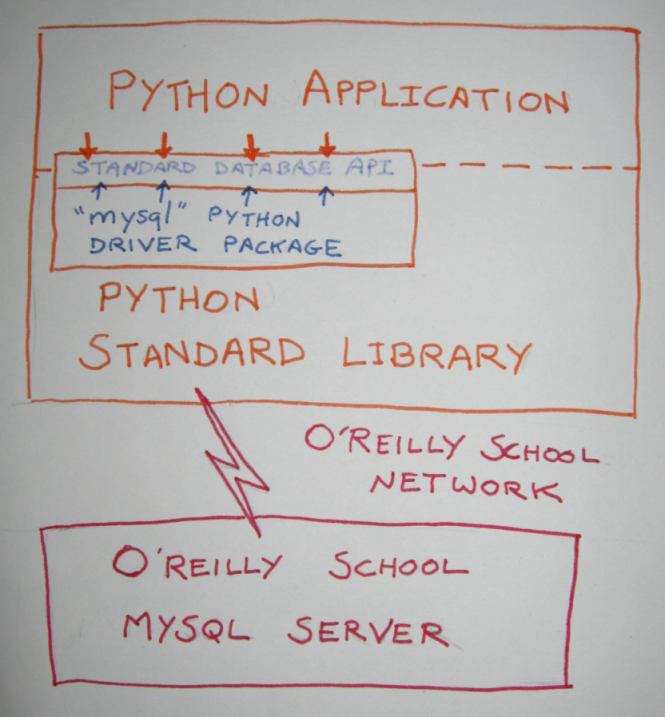
SQLite conforms quite closely to the Python DBAPI specifications for the way your programs should interact with the database. Support for many relational databases, both open source and proprietary, is readily available using well-tried third-party modules.
SQL is the common interface between databases and their applications. This means that you don't need to incorporate information about the physical representation of data on the storage media. Also, SQL processors do all the "grunt work" of optimization, and do not require programmers to specify the complex operations that complex queries require.
| Modern Python | The SQLite.connector module used in this lesson is one of several options available today.
Current choices include SQLite-connector-python (the official Oracle driver, installable via
pip install SQLite-connector-python), PySQLite (a pure-Python alternative,
pip install pySQLite), and the standard library's sqlite3 module for a serverless,
zero-configuration option that stores the entire database in a single file. All three conform to the
DB-API 2.0 specification (PEP 249), so the patterns shown in this lesson apply to all of them. |
The SQLite database server is a popular open-source database software, and is available for use on a wide variety of platforms. We'll use the SQLite database for our examples.
If you write in an SQL dialect that most database systems support, your SQL (and therefore your programs) should run successfully against most database systems without change. Even though SQL is standardized, each database vendor has a different interface, as well as different extensions of SQL. We create our notes and examples here to be general-purpose, so you can use them on this or other databases, but remember that changes may be required.
At a shell prompt, connect to a SQLite server by typing:
cold:~$ mysql -h sql -u <username> -p <username>
TODO: ADAPT TO SQLITE
SQLite -h sql -u <username> -p <username>
Excellent! You're in!
Structured Query Language (SQL) is a command-based free-form language. All whitespace is considered equivalent, and the keywords, table names, and column names are not case-sensitive. It is common convention to write SQL keywords in upper-case letters so they can be readily identified.
In fact, SQLite is picky about table names, and it's best practice to remain consistent, using the exact table names that you create originally. No database will ever complain because you got the case right!
Each statement in SQL begins with a characteristic verb or phrase, which indicates the broad purpose of the statement. SQL actually includes three sub-languages, two of which we'll consider in this course: Data Definition Language and Data Manipulation Language. (The third, Data Control Language or DCL, is used to determine which users get permission to perform which operations on which pieces of data, and is outside the scope of this course.)
DDL is the subset of SQL that allows you to define and modify database objects such as tables and indexes. There are three basic verbs used in DDL:
- CREATE inserts new definitions into the data dictionary.
- DROP removes definitions from the data dictionary.
- ALTER modifies definitions already present in the data dictionary.
Here is a description of two relational tables that might be part of a library information system. At the SQLite prompt, enter the SQL shown below to create two tables:
mysql> CREATE TABLE Book(
 	-> BkISBN CHAR(12) NOT NULL,
    -> BkTitle VARCHAR(30) NOT NULL,
    -> BkPubNo INT,
    -> BkYear INT);
Query OK, 0 rows affected (0.01 sec)

mysql> CREATE TABLE Publisher(
 	-> PubNo INT PRIMARY KEY,
 	-> PubName VARCHAR(25),
 	-> PubURL VARCHAR(50));
Query OK, 0 rows affected (0.01 sec)
Here you create a table in SQL using the phrase "CREATE TABLE" followed by the name of the table you want to create, followed by a parenthesized list of column specifications separated by commas. Each column specification determines the data type of the values that are stored in the column and can specify other constraints (PRIMARY KEY specifies a constraint on the Publisher table—we'll learn about others later).
In many database systems, constraints do not need to be specified when the table is created. They can be added later using the ALTER TABLE statement. Now enter these statements in SQLite for the tables you defined:
mysql> ALTER TABLE Book
    ->    ADD CONSTRAINT Bk_PK
    ->    PRIMARY KEY(BkISBN);

mysql> ALTER TABLE Book
    ->    ADD CONSTRAINT Bk_Pub_FK
    ->    FOREIGN KEY (BkPubNo) REFERENCES Publisher;
The second statement expresses the fact that a relationship exists between Book and Publisher: each book is related to (published by) one of the publishers in the Publisher table. A publisher is identified by its primary key (the value of the PubNo column). Consequently, the publisher of a given book is recorded by storing the appropriate PubNo value from Publisher, as the value of the BkPubNo column for the row representing the book. We'll talk more about relationships later.
This is the most commonly used subset of SQL; it is used to manipulate and query the data in the relational structures maintained by the DDL, and is what updates the model and answers questions based on its content. There are four statements in the Data Manipulation Language:
- INSERT adds new rows to user tables.
- SELECT retrieves information from one or more tables in the database (including data dictionary tables if requested).
- UPDATE allows changes to be made to existing rows in user tables.
- DELETE removes rows from user tables.
INSERT: Adding A Row to a Table
Now, we'll use the INSERT statement to insert some book and publisher data. In SQLite, enter the code as shown:
mysql> INSERT INTO Publisher (PubNo, PubName, PubURL)
    -> VALUES (1, 'O''Reilly', 'www.ora.com');
Query OK, 1 row affected (0.00 sec)

mysql> INSERT INTO Publisher (PubNo, PubName, PubURL)
    -> VALUES (2, 'New Riders', 'www.newriders.com');
Query OK, 1 row affected (0.00 sec)

mysql> INSERT INTO Book (BkISBN, BkTitle, BkPubNo, BkYear)
    -> VALUES('7807', 'Python Web Programming', 2, 2002);
Query OK, 1 row affected (0.00 sec)

mysql> INSERT INTO Book (BkISBN, BkTitle, BkPubNo, BkYear)
    -> VALUES('0596', 'Learning Python', 1, 2009);
Query OK, 1 row affected (0.00 sec)
Each INSERT statement adds one row to the database table, named after the "INSERT INTO" clause. The values in the VALUES list match up with the columns given in the list immediately following the table name.
| Note | You may see code containing SQL INSERT statements that don't include the list of column names, instead relying on the order of the column names when the table was created. This is not a best practice. |
SELECT: Retrieve Data from One or More Tables
Once you have data in your database, you can retrieve information using the SELECT statement. Enter the code below as shown:
mysql> SELECT BkTitle, BkISBN, PubName
    -> FROM Book JOIN Publisher ON BkPubNo = PubNo;
+------------------------+--------+------------+
| BkTitle                | BkISBN | PubName    |
+------------------------+--------+------------+
| Python Web Programming | 7807   | New Riders |
| Learning Python        | 0596   | O'Reilly   |
+------------------------+--------+------------+
2 rows in set (0.05 sec)

mysql>
The statement above retrieves the ISBN and title of the book from the Book table and the relevant publisher's name from the Publisher table, and puts them together—this is called joining the tables. This results in the two rows of data shown.
UPDATE: Modify Existing Data in a Table
The UPDATE statement is used to modify existing data, and can change zero, one, or more rows in a single table. Suppose a second edition of Python Web Programming were published, then the database could be modified to reflect the new book. Add the code below as shown:
mysql> UPDATE Book SET BkTitle='Python Web Programming, 2nd Ed',
    -> BkYear=2010
    -> WHERE BkISBN='7807';
Query OK, 1 row affected (0.05 sec)
Rows matched: 1  Changed: 1  Warnings: 0

mysql>

mysql> SELECT * FROM Book;
+--------+--------------------------------+---------+--------+
| BkISBN | BkTitle                        | BkPubNo | BkYear |
+--------+--------------------------------+---------+--------+
| 7807   | Python Web Programming, 2nd Ed |       2 |   2010 |
| 0596   | Learning Python                |       1 |   2009 |
+--------+--------------------------------+---------+--------+
2 rows in set (0.04 sec)

mysql>
The output from the SELECT statement (the "*" simply means "all columns") shows that, in this case, precisely one row was updated by the UPDATE statement. That happened because the WHERE clause specified a condition that was only met by one row in the given table.
DELETE: Remove Rows From a Table
The DELETE statement removes all rows meeting a specific condition, again expressed in a WHERE clause. You need to be really careful here—if you do not specify a WHERE clause, all rows in the table will disappear! At the SQLite prompt type the code below as shown:
mysql> DELETE FROM Book WHERE BkISBN='0596';
Query OK, 1 row affected (0.00 sec)

mysql> SELECT * FROM Book;
+--------+--------------------------------+---------+--------+
| BkISBN | BkTitle                        | BkPubNo | BkYear |
+--------+--------------------------------+---------+--------+
| 7807   | Python Web Programming, 2nd Ed |       2 |   2010 |
+--------+--------------------------------+---------+--------+
1 row in set (0.04 sec)

mysql>
Relational systems use a special value called null to represent the fact that either no data is available for a specific column in a given row, or that that column is irrelevant in the case of the particular row in question.
While the null value (indicated as NULL in SQL statements) has its uses, you need to be careful of its counter-intuitive properties. Because the null value in effect represents the absence of data, it introduces a third possibility beyond true or false—unknown—as the result of a comparison.
Consequently, if you are testing a column for a given value, NULLs will not be included whether you test for equality or inequality (which you do IN SQL using "=" and "<>", respectively). Since we are used to the value of a comparison being true or false, it's easy to forget to take this oddity into account. Use SQLite to check this out. Enter this SQL to see how NULL values affect comparisons:
mysql> INSERT INTO Book (BkISBN, BkTitle, BkPubNo)
    -> VALUES ('1234', 'Pythonic Attitudes', 2);
Query OK, 1 row affected (0.01 sec)

mysql> INSERT INTO Book (BkISBN, BkTitle, BkPubNo, BkYear)
    -> VALUES ('0987', 'My Little Python', 1, 2005);
Query OK, 1 row affected (0.01 sec)

mysql> SELECT * FROM Book;
+--------+--------------------------------+---------+--------+
| BkISBN | BkTitle                        | BkPubNo | BkYear |
+--------+--------------------------------+---------+--------+
| 7807   | Python Web Programming, 2nd Ed |       2 |   2010 |
| 1234   | Pythonic Attitudes             |       2 |   NULL |
| 0987   | My Little Python               |       1 |   2005 |
+--------+--------------------------------+---------+--------+
3 rows in set (0.05 sec)

mysql>
See the NULL value in the BkYear column for "Pythonic Attitudes?" (That's right, I said it. Pythonic Attitudes.) Now we'll run a number of queries on this updated data. Enter this SQL in the SQLite Terminal Window:
mysql> SELECT COUNT(*) FROM Book;
+----------+
| COUNT(*) |
+----------+
|        3 |
+----------+
1 row in set (0.04 sec)

mysql> SELECT COUNT(*) FROM Book WHERE BkYear <= 2005;
+----------+
| COUNT(*) |
+----------+
|        1 |
+----------+
1 row in set (0.04 sec)

mysql> SELECT COUNT(*) FROM Book WHERE BkYear > 2005;
+----------+
| COUNT(*) |
+----------+
|        1 |
+----------+
1 row in set (0.04 sec)

mysql>
So, we have three books; one published 2005 or earlier, and one published after 2005, and...wait a minute! If you don't see the problem here, think about how many books there are in the Books table. The first query answers that: there are three. Okay, so how many of them were published in or before 2005? The second query tells us there is one. The third query tells us that there is only one book published after 2005—the answer is again, one. But one plus one isn't three, and it's easy to overlook that the book with no year data couldn't be included in either result set.
You need to be careful of little things like this when your data allows NULL values, and we recommend that another best practice is to allow NULL values only where you actively want to permit them. So, you find out how many books there are in total by giving the SQL COUNT() function a "*" (all rows) argument. Counting the BkYear column is no good—because NULL values in that column are omitted from the COUNT(). Let's verify in the SQLite Terminal Window that NULLs are not COUNTed. Type in the code below as shown:
mysql> SELECT COUNT(BkYear) FROM Book;
+---------------+
| COUNT(BkYear) |
+---------------+
|             2 |
+---------------+
1 row in set (0.04 sec)

mysql>
Only two of our books have a BkYear. When we entered the "Pythonic Attitudes" book data, we didn't include a value for the year (sorry, we did that deliberately). In the result from the SELECT * FROM Book query, we mentioned that the value for BkYear for that row was NULL.
| Note | Data that can take the NULL value is sometimes referred to as optional. |
So, we used COUNT(), a SQL function that aggregates the number of rows that meet the given condition. A count of all rows clearly shows three rows, but we only saw one row with a year less than or equal to 2005 and one with a year that was greater than 2005. The third row didn't get counted by either of those conditions. The final query, where we explicitly counted the number of BkYear entries, makes it apparent that only two rows have an entry in that column.
Tables are at the heart of a database. Each table in a properly designed database, holds data concerning precisely one type of thing (an entity type, as it is more formally called in the database world). Suppose you want to keep information about a zoo; you would certainly want to record information about the animals, and you could do so in a single table.
Let's create a new database with a table for storing basic information about zoo animals. Again, if it's not still running, open a terminal window and start SQLite. Enter the code below in an interactive window to create a new table:
mysql> CREATE TABLE animal(
    -> id INTEGER PRIMARY KEY AUTO_INCREMENT,
    -> name VARCHAR(50),
    -> family VARCHAR(50),
    -> weight INTEGER);
Query OK, 0 rows affected (0.03 sec)
In the example above, you used a "CREATE TABLE" statement to create a table interactively with four columns: id, name, family, and weight. id and weight hold integer values; name and family hold character strings of varying length. Each column represents a different piece of data about each animal that can be stored—they are sometimes referred to as "attributes" of the animal entity.
The PRIMARY KEY column designation plays a special role in the table, which we'll discuss at length later. For now, be aware that using its primary key is the only way to guarantee that you are referring to a single row in the table; primary key values are always unique.
Now that we've created our table, let's put some data into it. The code below shows how to use the SQL "INSERT" statement. If you were writing SQL for direct execution by the database, you would write something like this:
INSERT INTO animal (id, name, family, weight) VALUES (1, 'Ellie', 'Elephant', 2350)
Note that SQL always uses single quotation marks to delimit string values. In a program though, you usually have the data in variables. While you could build the exact SQL statement you want to run using string manipulation, this is a really bad idea. If the data strings are from user input, it is too easy to allow the user to mess up your SQL, sometimes with disastrous results (try searching the web for "SQL injection vulnerability" to see how bad this can be). Fortunately, Python provides a mechanism to avoid these unpleasant security vulnerabilities. Which brings us to consider how your programs will interact with the database.
| Warning | Never build SQL statements by formatting values directly into a string—for example,
"SELECT * FROM animal WHERE name='" + name + "'". This opens your application to
SQL injection attacks. Always use parameterized queries: pass the SQL with %s
placeholders as the first argument to cursor.execute(), and supply the data as a
separate tuple: cursor.execute("SELECT * FROM animal WHERE name=%s", (name,)).
The DB-API driver handles all quoting and escaping safely. |
We've used SQL at the command line after securely logging in to a remote Linux system. Now we need to learn how to use it from inside of our Python programs, so that instead of just displaying the data we retrieve, we can execute Python statements using the data. That should make things a bit more interesting!
In order for a Python program to be able to talk to a database, it uses a special driver module. We are using the SQLite.connector module, calling its Connect() function to identify ourselves and obtain a database connection. Once the connection is created, a cursor is used to execute SQL commands over that connection. This program only inserts data into the database; it does not attempt to retrieve any data.
The DBAPI provides a solution to the SQL injection problem by allowing you to make what are called "parameterized queries." They're a little like passing arguments to Python functions. You include a special "parameter mark" ("%s" for the SQLite.connector module we use in this course) in the SQL statement to represent each piece of data, and then provide the data itself as an additional tuple to your database cursor's execute() method. Let's write a program to insert data into our animal table. Create tablepop.py as shown:
"""
Populates a table with data from a Python tuple.
"""
import mysql.connector
from database import login_info

if __name__ =="__main__":

    db = mysql.connector.Connect(**login_info)
    cursor = db.cursor()

    data = (
            ("Ellie", "Elephant", 2350),
            ("Gerald", "Gnu", 1400),
            ("Gerald", "Giraffe", 940),
            ("Leonard", "Leopard", 280),
            ("Sam", "Snake", 24),
            ("Steve", "Snake", 35),
            ("Zorro", "Zebra", 340)
            )

    cursor.execute("DELETE FROM animal")
    for t in data:
        cursor.execute("""
        INSERT INTO animal (name, family, weight)
        VALUES (%s, %s, %s)""", t)

    db.commit()
    print("Finished")
When you save and run this program, naturally, it raises an exception; rather than insert our login credentials into this program, we're importing them as something called login_info from a module named database, which doesn't yet exist.
| Note | You may see a warning on the import SQLite.connector line in this program. Ignore it for now. |
Create database.py, entering your login username in place of "username" and your password in place of "password":
USERNAME = "username"
PASSWORD = "password"

login_info = {
            'host': "sql.oreillyschool.com",
            'user': USERNAME,
            'password': PASSWORD,
            'database': USERNAME,
            'port': 3306
            }
This code creates a dict. The dict's items will become keyword arguments to the SQLite.connector.Connect() function (remember, the "**" tells the interpreter to convert the dict into a set of keyword arguments). Normally, to connect to a database server, you need to know a few pieces of information, which you have to pass to the driver when connecting to the database. The names of the first four arguments (host, user, password, and database) will probably make their purpose obvious. The fifth argument, port, is required so the driver knows exactly where to connect on the database server. Save this database module, then re-run tablepop.py. The program inserts seven rows into your database's animal table, and prints FINISHED. But don't take our word for it—check for yourself after you learn what your program did! Let's look at the code more closely:
"""
Populates a table with data from a Python tuple.
"""
import SQLite.connector
from database import login_info

if __name__ =="__main__":

    db = SQLite.connector.Connect(**login_info)
    cursor = db.cursor()

    data = (
            ("Ellie", "Elephant", 2350),
            ("Gerald", "Gnu", 1400),
            ("Gerald", "Giraffe", 940),
            ("Leonard", "Leopard", 280),
            ("Sam", "Snake", 24),
            ("Steve", "Snake", 35),
            ("Zorro", "Zebra", 340)
            )

    cursor.execute("DELETE FROM animal")
    for t in data:
        cursor.execute("""
        INSERT INTO animal (name, family, weight)
        VALUES (%s, %s, %s)""", t)

    db.commit()
    print("Finished")
First let's consider the database connection. The statement db = SQLite.connector.Connect(**login_info) is equivalent to db = SQLite.connector.Connect(host= ..., user= ..., ...), with the dict imported from the database module providing both the names and the values of the parameters to the Connect() function.
Next, the statement cursor = db.cursor() creates a database cursor, which is how we present SQL statements to the database for execution (you can create several cursors on the same connection if you want to, but usually you won't do that). Next, the program loops over each of the tuples in data, presenting each tuple as the second argument to a call to the cursor's execute() method.
Each time we called the cursor.execute() method, we provided the same parameterized SQL INSERT statement (containing three "%s" parameter marks to indicate where the data should go) as the first argument. The second argument was the tuple of data items. This inserted a new row into the animal table.
| Note | The INSERT statement didn't provide a value for the id column. Where did the IDs come from? When we created the table, we declared id as INTEGER PRIMARY KEY AUTO_INCREMENT. AUTO_INCREMENT specifies that the id column of any row that is inserted into the table with no id value specified, will be set to one greater than the highest value that was ever stored in that column. In practice, this normally means that values start at one and go up, which is what we see here. If you have inserted and deleted other rows (good for you for experimenting!), you might see different numbering. |
| Modern Python | Both the connection and the cursor support the context manager protocol in modern
drivers, so you can write:
with SQLite.connector.connect(**login_info) as db:
    with db.cursor() as cursor:
        cursor.execute(...)
The connection is closed (and any pending transaction rolled back) automatically when the
with block exits, even if an exception occurs. This is the preferred style and
avoids accidentally leaving connections open. |
So, now that we know what was supposed to happen inside tablepop.py, we should check to make sure that it ran correctly!
In the Terminal tab, open a connection to the database, and verify the contents of the animal table. Type this code at the SQLite prompt:
mysql> SELECT * FROM animal;
+----+---------+----------+--------+
| id | name    | family   | weight |
+----+---------+----------+--------+
|  1 | Ellie   | Elephant |   2350 |
|  2 | Gerald  | Gnu      |   1400 |
|  3 | Gerald  | Giraffe  |    940 |
|  4 | Leonard | Leopard  |    280 |
|  5 | Sam     | Snake    |     24 |
|  6 | Steve   | Snake    |     35 |
|  7 | Zorro   | Zebra    |    340 |
+----+---------+----------+--------+
7 rows in set (0.04 sec)
You already saw in the book/publisher example that it is possible for a row in one table to refer to a row in another table. Each book indicates its publisher in a column called BkPubNo that holds the value of the PubNo field of one of the rows in the Publisher table.
The BkPubNo column in the Book table is called a foreign key—it stores a primary key value from some row in another table. Since primary key values are guaranteed to be unique, a foreign key value refers just once to a single instance of the related entity.
Foreign keys are used to express the fact that relationships exist between two entities. In this case, we might say that "book is-published-by publisher," or equivalently that "publisher publishes book." Since each book can have only one publisher, but any given publisher can publish many books, we say that the relationship is "many-to-one" between book and publisher, or equivalently that it is "one-to-many" between publisher and book.
Relationships can turn mere data into information. Without the relationships, we could not show the publisher of each book in the query we ran earlier.
For data to be stored in the database, it must meet certain rules, which we'll summarize in a minute. Most relational databases will enforce these rules automatically to maintain the integrity of the relational structures. For this reason, the rules are often referred to as integrity constraints. Your application may also have its own integrity requirements imposed on the database content.
For example, it's fairly common in order processing systems to assign each customer a credit limit, to allow them to purchase a certain amount without advance payment. Generally a customer's credit limit will be increased as they demonstrate their trustworthiness. When a new order is received, the system checks how much the customer already owes, and if the new order would take them over their credit limit, it refuses to release the new order (at least without some manual override action). So the constraint there is that each customer's unpaid order total must be less than their credit limit. Constraints imposed because of the organization's requirements are often referred to as business rules, or semantic integrity constraints, but they are still constraints. They are frequently so complex that it isn't reasonable to expect the database to maintain them without help from code in the application.
In this section, we discuss the integrity constraints that we usually expect the database to maintain without any help.
Each row of a table must be uniquely identifiable. The easiest way to ensure this is to have a column or collection of columns that is guaranteed unique for every row in the table. This column (or collection) is designated as the primary key. A primary key that is made up of more than one column is referred to as a composite primary key. The database will not allow two rows with the same primary key value to exist. You can see for yourself by trying to create a duplicate id value in the animal table. In the interactive console, type the code below as shown:
mysql> INSERT INTO animal (id, name, family, weight)
    -> VALUES (1, "Harold", "Hyena", 80);
ERROR 1062 (23000): Duplicate entry '1' for key 1
mysql>
The error message tells you that the row could not be created because that would have resulted in a duplicate primary key, which in turn would violate the built-in integrity constraint.
No part of the primary key may be null. The primary key is used as the unique identifier for the rows of a table. Since the result of a comparison between anything and null is unknown, it would be impossible to answer yes or no to the question "does the primary key of this row have that value?"
Attribute values must be "atomic". There is no way to store more than one value for a given attribute in any row. If you need to do that, you need to create a relationship instead. You can learn more about this under "Implementing Multi-Valued Attributes" below.
Foreign key values must exist as primary key values in the related table. This is a fairly straightforward interpretation of the meaning of relationships. Because a book's publisher is indicated by its BkPubNo attribute, the value of that attribute must be a reference to a real publisher.
What if we wanted to store details about what each animal in our zoo eats? One way to do this would be to add a food column to the table. But what if an animal can eat more than one type of food? A common mistake of new database programmers make is to try and store several values in a single column, as in this table:
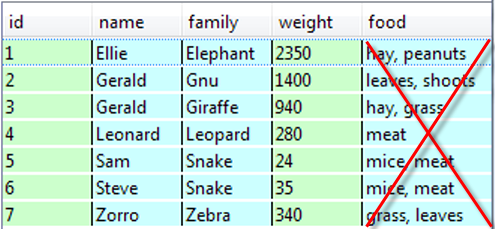
Don't do this. The red X is there to remind you that this is a terrible idea. Using a table like this would make it next to impossible to answer relatively simple queries like "which animals eat grass?" The solution to this problem is to introduce an entirely new entity to store this information, and put the new entity in a relationship with the animal entity by storing the primary key of the animal as an attribute of the new food entity. Let's do that now. We'll use some DDL to create the new table and some DML to add the rows. Create addfood.py as shown:
"""
Create the food table and add all necessary data.
Note that the foods are identified by the animal's
name and family, so we have to look up the primary key.
"""

import mysql.connector
from database import login_info

db = mysql.connector.Connect(**login_info)
cursor = db.cursor()

cursor.execute("""DROP TABLE IF EXISTS food""")
cursor.execute("""
    CREATE TABLE food (
        id INTEGER PRIMARY KEY AUTO_INCREMENT,
        anid INTEGER,
        feed VARCHAR(20),
        FOREIGN KEY (anid) REFERENCES animal(id))
    """)

data = [('Ellie', 'Elephant', ['hay', 'peanuts']),
        ('Gerald', 'Gnu', ['leaves', 'shoots']),
        ('Gerald', 'Giraffe', ['hay', 'grass']),
        ('Leonard', 'Leopard', ['meat']),
        ('Sam', 'Snake', ['mice', 'meat']),
        ('Steve', 'Snake', ['mice', 'meat']),
        ('Zorro', 'Zebra', ['grass', 'leaves'])]

for name, family, foods in data:
    cursor.execute("SELECT id FROM animal WHERE name=%s and family=%s",
                 (name, family))
    id = cursor.fetchone()[0]
    for food in foods:
        cursor.execute("""INSERT INTO food (anid, feed)
                        VALUES (%s, %s)""", (id, food))
    db.commit()
    print("Processed", name, family, id)
| Note | Unlike tablepop.py, this program does not require that the table be created before it is run. To remove any uncertainty about the state of the table, the DROP TABLE IF EXISTS statement is present to make sure that no food table exists when the CREATE TABLE statement is executed. If no such table exists then the DROP TABLE IF EXISTS statement has no effect. |
When you run the program, it prints out each animal's details:
Processed Ellie Elephant 1
Processed Gerald Gnu 2
Processed Gerald Giraffe 3
Processed Leonard Leopard 4
Processed Sam Snake 5
Processed Steve Snake 6
Processed Zorro Zebra 7
So now you have a record of which animals eat which foods. Again, this is expressed as a relationship: animals eat food (one-to-many), food is-eaten-by animal (many-to-one). Now try a few queries through the interactive window. Use SQLite to query the database:
mysql> SELECT * FROM food;
+----+------+---------+
| id | anid | feed    |
+----+------+---------+
|  1 |    1 | hay     |
|  2 |    1 | peanuts |
|  3 |    2 | leaves  |
|  4 |    2 | shoots  |
|  5 |    3 | hay     |
|  6 |    3 | grass   |
|  7 |    4 | meat    |
|  8 |    5 | mice    |
|  9 |    5 | meat    |
| 10 |    6 | mice    |
| 11 |    6 | meat    |
| 12 |    7 | grass   |
| 13 |    7 | leaves  |
+----+------+---------+
13 rows in set (0.04 sec)

mysql> SELECT name, family, feed
    -> FROM animal JOIN food ON animal.id=food.anid
    -> WHERE feed IN ('meat', 'leaves');
+---------+---------+--------+
| name    | family  | feed   |
+---------+---------+--------+
| Gerald  | Gnu     | leaves |
| Leonard | Leopard | meat   |
| Sam     | Snake   | meat   |
| Steve   | Snake   | meat   |
| Zorro   | Zebra   | leaves |
+---------+---------+--------+
5 rows in set (0.05 sec)

mysql> SELECT feed
    -> FROM animal JOIN food ON animal.id=food.anid
    -> WHERE name='Sam' AND Family='Snake';
+------+
| feed |
+------+
| mice |
| meat |
+------+
2 rows in set (0.04 sec)

mysql> SELECT COUNT(*) FROM food WHERE feed='meat';
+----------+
| COUNT(*) |
+----------+
|        3 |
+----------+
1 row in set (0.04 sec)

mysql>
The output shows that each row in the food table contains the relevant animal id. By joining the animal table to the food table on equality of animal id, we produce output containing one row for each combination of animal and food. A given animal can be associated with multiple foods, and the animal data is duplicated as many times as necessary, once for each related food row. That's how the SQL JOIN feature works.
For almost thirty years now, the relational database has been the dominant model for storing persistent data. As you saw in an earlier lesson, Python has its own mechanisms, which are great when only Python programs are concerned, but not so useful when multiple languages must be used. In addition, there is a huge amount of "legacy data" already stored in databases, and Python would not be a very good programming language if it couldn't make use of that data. Of course now you understand that it can, although you've only used SQLite, there are Python drivers for almost every imaginable database.
When you use a database (or any other persistent data store) you are effectively creating a model of selected portions of the world. Though the model describes only those aspects of the world that are of interest to your application. For instance, when writing a hospital information system, you would probably want to know the names and birth dates of the patients, but most likely not their favorite football team or the kind of car they drive. Similarly, you would probably want to know how many beds are in each ward, but the color the walls are painted would not be particularly relevant.
The value of these models is that if you can keep them up to date (by changing them as the world changes—reducing the stock quantity of a product when some is sold, for example—you can answer questions about the real world by querying the model. If someone sends an order in for six widgets and you only have three in stock, you can respond by telling the customer there will be a slight delay, and then order more widgets from your supplier without having to walk to the warehouse and check the physical stock.
One of the remarkable things about relational structures is that they're powerful enough to describe other relational structures. Since a database is packed full of routines to handle relational structures, it makes sense that most relational database management systems (RDBMSs) actually store a relational description of the application data structures they are used to create.
| Note | This description is often called the data dictionary, or the system catalog, or various other names. Many databases even allow you to retrieve data from the data dictionary, thereby allowing you to query the structure of the database (the data dictionary is comprised of tables, after all). If you are given access to the data dictionary, please remember never to try to update those tables directly yourself (unless you happen to be an experienced database administrator)—that's the RDBMS's job! |
If you want to experiment with databases on your own computer, take a look at a standard library module, sqlite3, that lets you create and use relational structures without the complexity of an external database server and client/server communications. All data are stored in files held on the same computer that the programs run on. sqlite3 has some limitations and a few quirks but it's a good place to start, and has been used to support many production programs.
Phew! Let's take a little break before moving on to the next lesson... okay, break's over. Let's go!